Windows XP Windows 7 Windows 2003 Windows Vista Windows 綜合教學 Linux 系統教學
Windows 10 Windows 8 Windows 2008 Windows NT Windows Server 電腦軟體教學

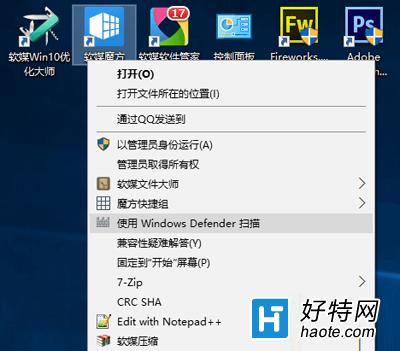
Win10 右鍵選單移除 Windows Defender 掃描項:刪除登錄機碼 ContextMenuHandlers\EPP 兩處即可

編輯:Win10 系統應用技巧

Win10 右鍵選單常被 Windows Defender 新增「使用 Windows Defender 掃描」項目,易誤觸且佔用空間。透過刪除登錄機碼可徹底移除。
移除步驟

  1. Win+R 輸入 regedit 開啟登錄編輯器。
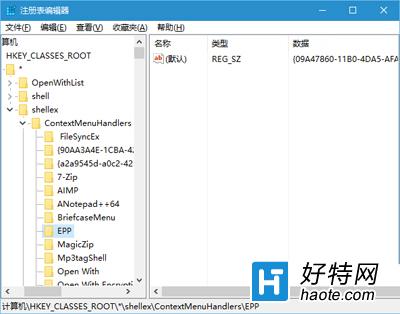
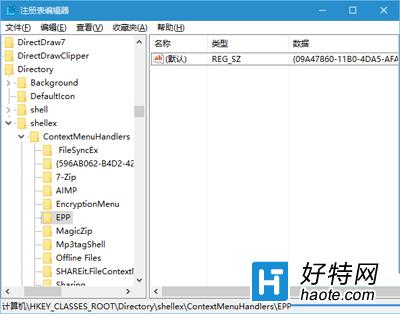
  2. 依序定位並刪除以下兩個金鑰 (右鍵金鑰 → 「刪除」):
    • HKEY_CLASSES_ROOT\*\shellex\ContextMenuHandlers\EPP
    • HKEY_CLASSES_ROOT\Directory\shellex\ContextMenuHandlers\EPP
  1. 重新開機或重新登入生效,右鍵選單不再顯示 Defender 掃描項目。

恢復方法

若日後需恢復,重建上述兩個 EPP 金鑰,並在各金鑰下將「預設」字串值設為:

{09A47860-11B0-4DA5-AFA5-26D86198A780}

補充: 同邏輯適用於移除其他右鍵選單殘留項目 (如舊版壓縮軟體、雲端同步工具),只需在 ContextMenuHandlers 下找到對應金鑰名稱刪除即可。

Copyright © Windows教程網 All Rights Reserved