Windows XP Windows 7 Windows 2003 Windows Vista Windows 綜合教學 Linux 系統教學
Windows 10 Windows 8 Windows 2008 Windows NT Windows Server 電腦軟體教學

Win10 語音喚醒 Cortana 設置教程:「你好小娜」/「Hey Cortana」免提喚醒

編輯:Win10 系統應用技巧

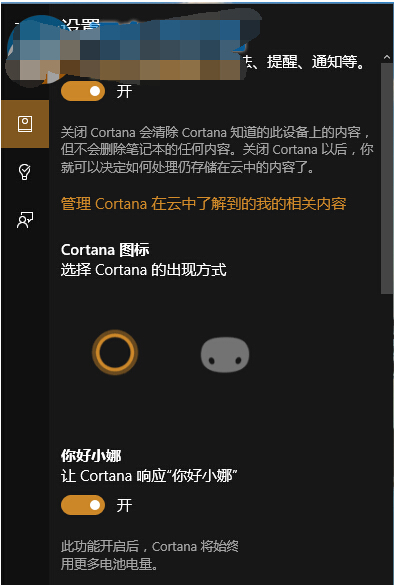
想像鋼鐵俠喚醒賈維斯一樣喚醒 Cortana?開啟語音喚醒:

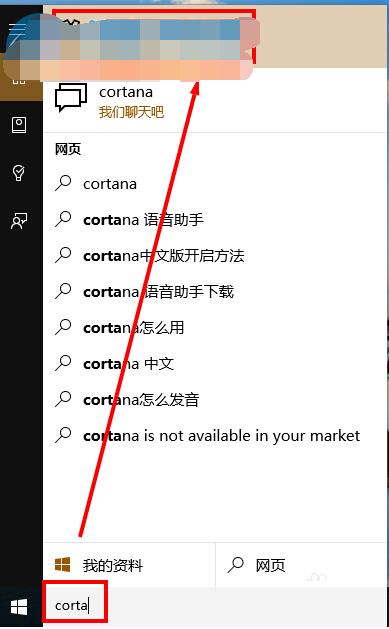
  1. Cortana 搜索框輸入「Cortana」 → 點擊「Cortana 和搜索設置」
  2. 「你好小娜」開關置「開」
  3. 前提:已登錄 Microsoft 賬戶、麥克風正常、語言區域設為中文 (中國) / 英文 (美國)
喚醒詞

  • 中文:「你好,小娜」
  • 英文:「Hey, Cortana」

喚醒後直接說指令:「設定 10 分鐘鬧鐘」、「播放周杰倫的歌」、「明天北京天氣」。免提操作極大解放雙手,適合居家/辦公/駕駛 (藍牙麥克風) 場景。

Copyright © Windows教程網 All Rights Reserved