若因嘗試切換 Insider 通道、移除浮水印等操作修改了註冊表 HKEY_LOCAL_MACHINE\SOFTWARE\Microsoft\WindowsSelfHost\Applicability,導致無法接收更新,可透過管理員命令提示字元執行指令恢復預設值。
以系統管理員身分開啟命令提示字元,依序貼上執行:
reg add "HKEY_LOCAL_MACHINE\SOFTWARE\Microsoft\WindowsSelfHost\Applicability" /v "BranchName" /d "fbl_release" /t REG_SZ /f
reg add "HKEY_LOCAL_MACHINE\SOFTWARE\Microsoft\WindowsSelfHost\Applicability" /v "ThresholdRiskLevel" /d "low" /t REG_SZ /f
reg delete "HKEY_LOCAL_MACHINE\SOFTWARE\Microsoft\WindowsSelfHost\Applicability" /v "ThresholdInternal" /f
reg delete "HKEY_LOCAL_MACHINE\SOFTWARE\Microsoft\WindowsSelfHost\Applicability" /v "ThresholdOptedIn" /fBranchName = fbl_releaseThresholdRiskLevel = lowThresholdInternal、ThresholdOptedIn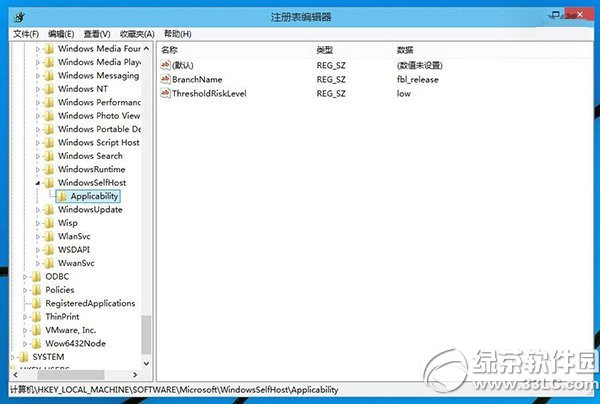
註冊表修改風險高,操作前請務必匯出備份(檔案 → 匯出 → 全部),以便異常時還原。
Win10 Excel 無法關閉怎麼辦?更新顯卡驅動或停用硬體圖形加速修復
Win10 Build 10537 更新內容一覽:Edge 安全性提升、UI 微調、動畫效果新增
Windows 10 開啟服務管理器 兩大快速法 (services.msc / Win+X)
Win 10「無法開啟這個應用程式」錯誤?啟用使用者帳戶控制 (UAC) 即可解決
Win10 恢復開始畫面 (取代開始選單) 教學:工作列屬性一鍵切換
Win10 常用快捷鍵大全:虛擬桌面、小娜、截圖、遊戲錄製、多螢幕 25+ 組合鍵