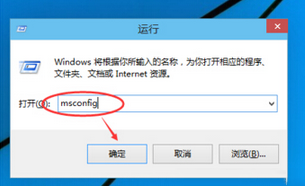
部分使用者在使用 ISO 映像檔覆蓋升級 Win10 9926 時,會長時間卡在「檢查更新」畫面。經網友測試,解決方法非常簡單:
離線升級可避免安裝程式嘗試連線微軟伺服器檢查更新而導致卡住。
微軟發布 9926 版本時同步釋出已知問題清單與 1 月技術預覽版更新。建議升級完成後,儘快連網安裝最新累積更新,修復已知問題。
Windows 10 Build 10036 預覽版安裝體驗與介面變化
Win10 修改本地帳號使用者名稱:控制台使用者帳戶變更名稱、或電腦管理本地用戶重新命名
徹底關閉 Win10 免費升級提示圖示的兩大絕招
Windows 10 週年更新預覽版 14390 更新內容:Amazon Assistant 擴充功能與 Bug 修復
Windows 10 啟用/關閉來賓帳戶:控制台使用者帳戶四步驟完成
Windows 10 耗電量測試:節電模式效果分析與 Win 8.1 比較
Win10 IE 瀏覽器如何禁止顯示圖片?Internet 選項進階設定關閉多媒體圖片載入省流量
Win10 螢幕鍵盤遮擋任務列?修改登錄表啟用 TaskbarAvoidance 解決