微軟釋出首個 Win10 開發工具技術預覽版,開發者可依循標準流程建置通用應用:
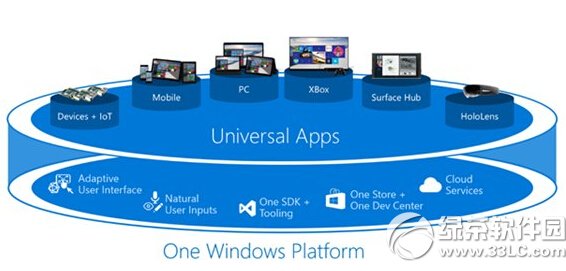
完成即可著手開發通用應用,為 Win10 正式版(預計夏季)做準備。
Win10 登錄備份與還原完整教學:完整備份、分支備份、雙重還原法
電腦管家 Win10 檢測 CPU 溫度過高?三招降溫通過檢測順利升級
Win10 系統需求規格完整版:1GHz CPU、1/2GB RAM、16/20GB 硬碟、DirectX 9 顯卡
Win10 如何使用內建圖片工具旋轉照片?「編輯 → 拉直」功能支援任意角度旋轉並自動裁切
Win10 小娜(Cortana)不說話怎麼辦?設定預設播放裝置解決
Win10 滑鼠右鍵反應慢/無反應?註冊表清理 ContextMenuHandlers 解決
Windows 10 Visual Studio 2010 提示缺少 rcdll.dll 解決:註冊表補齊 SDK 路徑