Windows XP Windows 7 Windows 2003 Windows Vista Windows 綜合教學 Linux 系統教學
Windows 10 Windows 8 Windows 2008 Windows NT Windows Server 電腦軟體教學

Windows 10 批次檔 定時關機/取消關機 一鍵自動化 (shutdown 指令)

編輯:Windows 10 系統介紹

無需第三方軟體,Windows 10 內建 shutdown 指令配合批次檔 (.bat) 即可實現定時關機、倒數關機、取消關機,適合下載完成、睡前聽音樂等場景。

建立定時關機批次檔

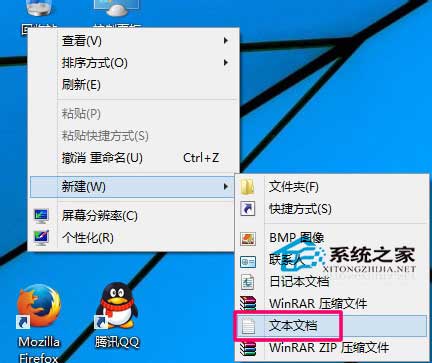
  1. 桌面右鍵 → 新增 → 文字文件,命名為 shutdown_1hr.bat (副檔名必為 .bat)。
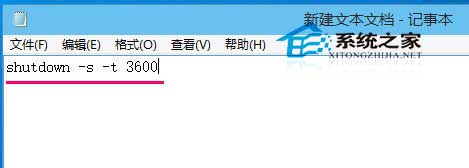
  2. 以記事本開啟,輸入以下指令:
shutdown -s -t 3600

-s = 關機;-t 3600 = 延遲 3600 秒 (1 小時)。常用時間對照:1800=30分、7200=2時、300=5分。
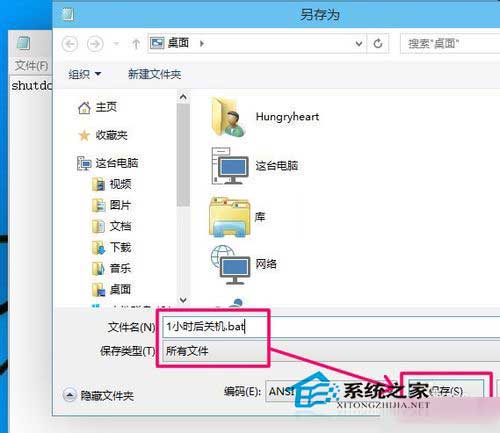
  1. 儲存關閉。雙擊執行即啟動倒數關機。

新增文字文件

輸入 shutdown 指令

另存為 .bat 批次檔

常用時間對照表

取消已排程的關機

  1. 按 Win+R 輸入 shutdown -a 按 Enter (指令為 shutdown /a 或 shutdown -a)。
  2. 系統提示「已取消登出/關機」。

進階應用:可建立多個 .bat 檔對應不同時長,或編寫選單式批次檔輸入分鐘數自動計算秒數。Windows 8/8.1 同樣適用。

Copyright © Windows教程網 All Rights Reserved