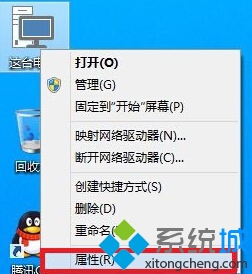
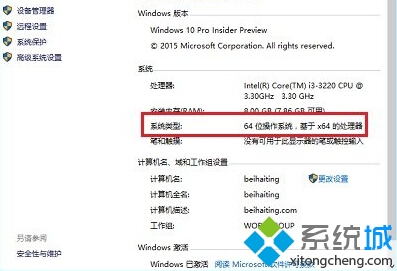
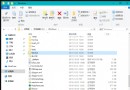
Windows 10 查詢系統位元數最快方法:
若為 32 位元系統且硬體支援 64 位元,建議重裝 64 位元版本以發揮完整效能。
Windows 10 螢幕亮度無法調整?三大成因與註冊表/驅動程式重裝完整解決方案
Win10 建議硬體配置詳解:官方最低規格 vs 實際順暢體驗規格
Win10 瀏覽器快取怎麼清?Edge/IE 清除暫存檔加速上網
Win10 右側邊欄(Charms Bar)不見了?用 Win+C 快捷鍵喚出
Windows 10 Build 10525 更新內容:彩色標題列個人化與記憶體壓縮存儲技術詳解
Win10 更新後開機變慢?四大優化方案加速啟動
Win10 更換「郵件」應用程式背景圖片,打造專屬收信介面
Win10 打開「電腦管理」三法:右鍵此電腦、檔案總管標籤、運行命令 compmgmt.msc