若誤修改 Windows 10 升級相關登錄導致無法接收更新,可透過系統管理員命令提示字元執行指令快速還原預設值。
reg add "HKEY_LOCAL_MACHINE\SOFTWARE\Microsoft\WindowsSelfHost\Applicability" /v "BranchName" /d "fbl_release" /t REG_SZ /f
reg add "HKEY_LOCAL_MACHINE\SOFTWARE\Microsoft\WindowsSelfHost\Applicability" /v "ThresholdRiskLevel" /d "low" /t REG_SZ /f
reg delete "HKEY_LOCAL_MACHINE\SOFTWARE\Microsoft\WindowsSelfHost\Applicability" /v "ThresholdInternal" /f
reg delete "HKEY_LOCAL_MACHINE\SOFTWARE\Microsoft\WindowsSelfHost\Applicability" /v "ThresholdOptedIn" /f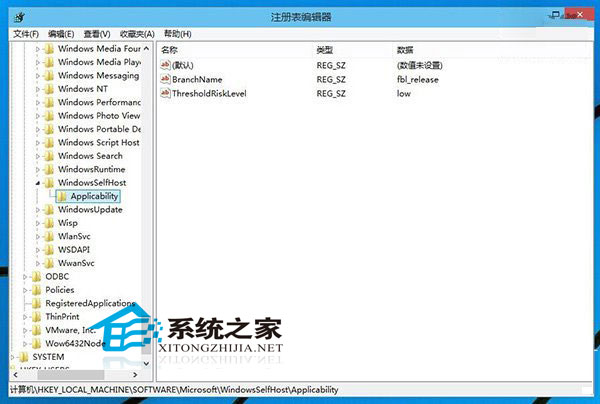
執行完畢建議重新啟動電腦。還原登錄可提升系統穩定性,解決多種疑難雜症,遇到難解系統問題時可嘗試此法。
Win10 商店/Modern App 開全域代理無法聯網/閃退?關閉系統代理設定即可恢復
Win10 修改預設開啟程式:Win+X → 控制台 → 程式 → 預設程式 → 設定預設程式,自訂檔案關聯
Win10 預覽版必須持續接收更新才能免費激活正式版,微軟澄清升級資格
Windows 10 啟用內建 Administrator 管理員帳戶教學
Windows 10 正式版發布時間:2015 年夏季,190 國 111 語言同步上市
Windows 10 如何禁止應用程式在背景執行?兩種方法輕鬆管理
Windows 10 正式版 Build 10240 更新內容:Edge 瀏覽器成熟度大增、Office Mobile 正式化