Win10 快速查看圖片檔案大小、解析度尺寸,無需開啟圖片檢視器。
方法一:滑鼠懸停工具提示(最快)
在檔案總管將滑鼠游標停留在圖片檔案上 **1-2 秒**,自動彈出工具提示顯示:檔案大小、影像尺寸(寬 x 高)、檔案類型、修改日期。
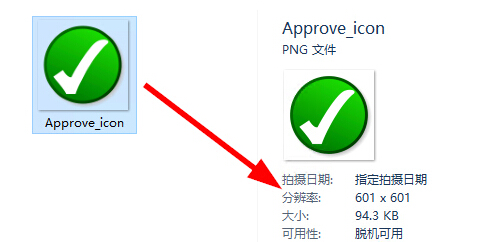
方法二:檔案總管「詳細資料」檢視
- 進入圖片所在資料夾。
- 「檢視」索引標籤 → 「詳細資料」。
- 清單右側新增欄位顯示:大小、維度、標記、拍攝日期等。
- 點選欄位標題可排序/分組。
補充技巧
- 「檢視」→「內容」檢視模式:縮圖 + 基本資訊並列。
- 右鍵圖片 →「屬性」→「詳細資料」索引標籤:查看完整 EXIF 資訊(相機型號、光圈、快門、ISO、GPS 等)。