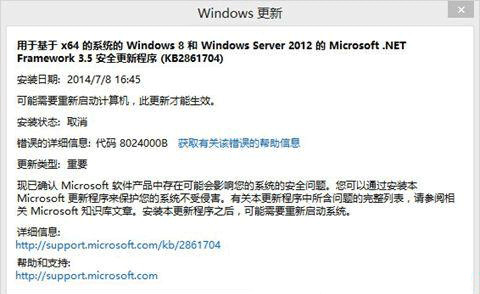
錯誤 0x8024000B 表示 Windows Update 無法讀取安裝所需檔案 (更新清單),適用於 Win7/8.1/10。
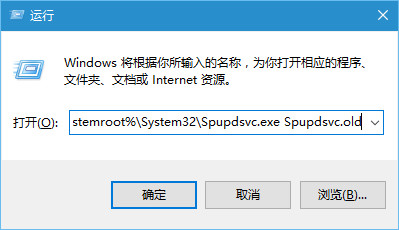
Cmd /c ren %systemroot%\System32\Spupdsvc.exe Spupdsvc.old
微軟官方建議此法可解決多數此類錯誤;若無效可嘗試重置 Windows Update 元件 (停用服務、重命名 SoftwareDistribution、重新啟動服務)。
Windows 10 忘記 PIN 碼如何重設?Microsoft 帳戶驗證重設流程
Win10 遊戲相容性測試:幾乎所有遊戲可執行,僅 24 款有嚴重 Bug
Windows 10 應用程式開發教學:Windows App Studio 快速建置 Web 託管 UWP 應用
Win10 無線網卡無法使用/黃色驚嘆號修復:手動指定驅動程序覆蓋安裝法
Win10 升級後回滾至舊版本:高級啟動選項還原 Windows.old
Windows 10 關閉/隱藏/停用小娜 (Cortana) 完整步驟:隱私設定停用語音墨跡收集
Win10 回饋與診斷頻率怎麼設?隱私設定調整資料傳送頻率
Edge 瀏覽器下載位置修改指南:透過移動「下載」資料夾釋放 C 槽空間