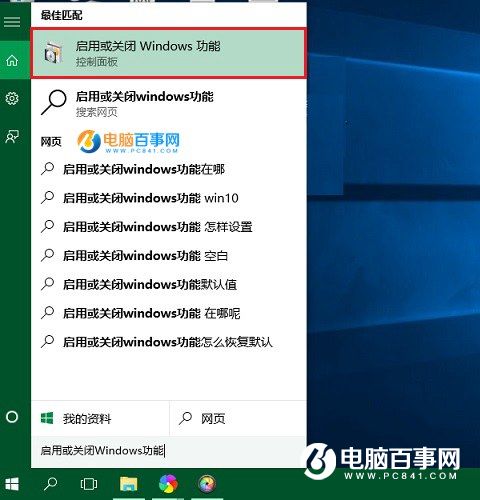
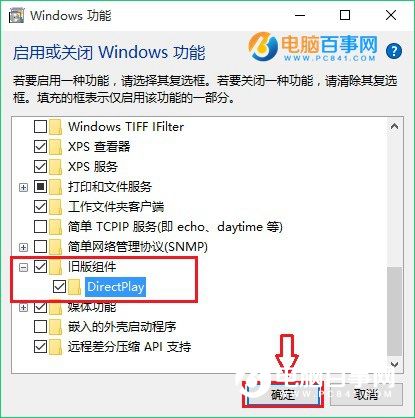
Win10 內建 DirectX 12,部分舊版遊戲(特別是 DirectX 9/10/11 時代)可能出現無法全螢幕、閃爍、花屏、報錯等問題。啟用「DirectPlay」舊版元件可提供向後相容,解決多數此類問題。
完成後重新啟動遊戲測試。此設定提供 DirectX 舊版 API 相容層,對早期依賴 DirectPlay 進行網路通訊的遊戲尤為關鍵。若問題持續,嘗試以相容模式執行遊戲(右鍵執行檔 > 內容 > 相容性 > 勾選「以相容模式執行」選擇 Windows 7/8)。
Win10 如何共享資料夾給區域網路其他電腦
Win10 內建虛擬光碟機進階技巧:右鍵掛載/彈出、不支援加密映像與開機自動掛載、第三方替代方案
Win10 正式版免費啟用全攻略:三大合法管道一次看懂
Hype 3 Mac 版使用入門:HTML5 動畫製作神器
Win10 命令提示符全屏顯示操作指南(含截圖演示)
Win10 右鍵選單新增「記事本」與「用記事本開啟」提升效率:註冊表雙模式
Win10 打不開 .doc 檔案亂碼?安裝 WPS Office 或 Microsoft Office 完美解決
Windows 10 啟用 Cortana (小娜) 語音助手教學:變更地區/語言為美國英文、登入 Microsoft 帳號、開啟「嘿 Cortana」