Windows XP Windows 7 Windows 2003 Windows Vista Windows 綜合教學 Linux 系統教學
Windows 10 Windows 8 Windows 2008 Windows NT Windows Server 電腦軟體教學

Windows 10 禁止存取指定網站:修改 hosts 檔案導向 127.0.0.1 或 0.0.0.0

編輯:Windows 10 系統介紹

Windows 10 封鎖特定網站最簡單方法:修改 C:\Windows\System32\drivers\etc\hosts 檔案,新增行 127.0.0.1 要封鎖的網址 或 0.0.0.0 要封鎖的網址 (IP 與網址空白隔開),儲存後即時生效。

操作步驟

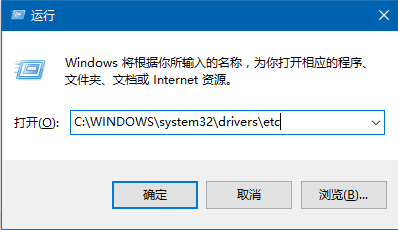
  1. Win + R → 輸入 C:\Windows\System32\drivers\etc → 確定開啟資料夾。
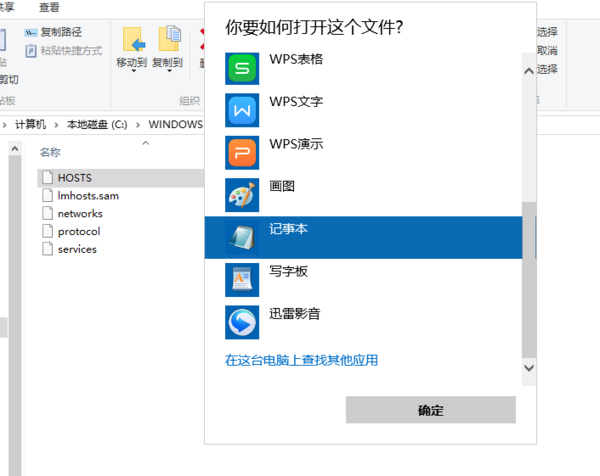
  2. 右鍵 hosts 檔案 → 「開啟方式」 → 「記事本」。
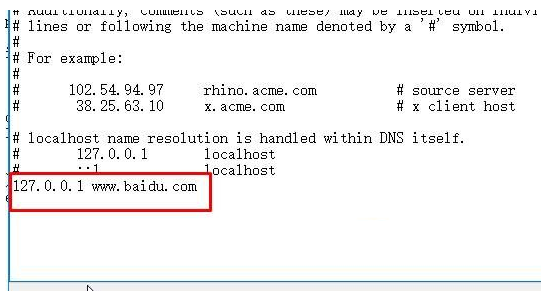
  3. 檔案末尾新增:127.0.0.1 example.com (每行一個網域)。
  4. 儲存 (需管理員權限,記事本以管理員身分開啟或複製到桌面改完再覆蓋回去)。

開啟 etc 資料夾

記事本開啟 hosts

新增封鎖規則

此法適用於所有瀏覽器與應用程式,無需安裝軟體。

Copyright © Windows教程網 All Rights Reserved