Windows XP Windows 7 Windows 2003 Windows Vista Windows 綜合教學 Linux 系統教學
Windows 10 Windows 8 Windows 2008 Windows NT Windows Server 電腦軟體教學

Windows 10 IE9 瀏覽器開網頁白屏解決:重設 IE 設定或關閉 GPU 硬體加速

編輯:Windows 10 系統介紹

Windows 10 下 IE9 開網頁白屏,可嘗試重設 IE 為預設值,或關閉 GPU 硬體加速改用軟體繪圖。

方法一:重設 Internet Explorer

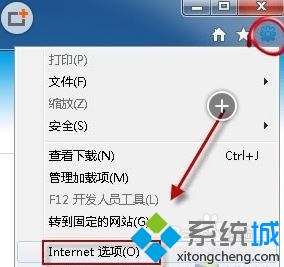
  1. 關閉所有 IE 視窗,開始搜尋「Internet Explorer」開啟。
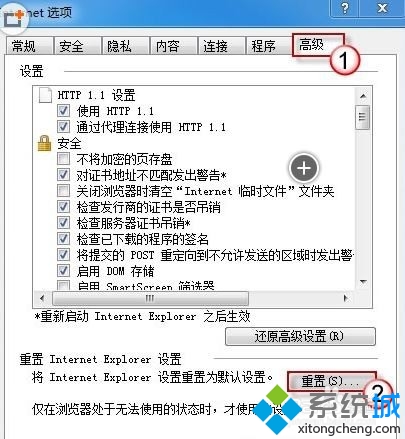
  2. 工具 → 網際網路選項 → 「進階」頁籤 → 「重設」。
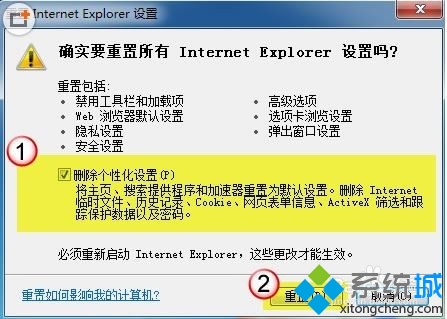
  3. 可勾選「刪除個人化設定」徹底重設,確定後重啟 IE。

開啟 IE

網際網路選項

進階頁籤重設

刪除個人化設定

重設完成

方法二:關閉 GPU 硬體加速

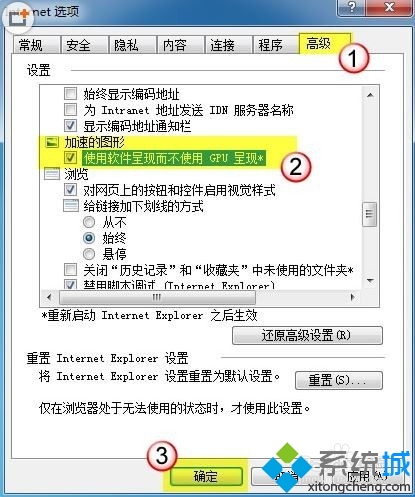
  1. 工具 → 網際網路選項 → 「進階」頁籤。
  2. 勾選「使用軟體繪圖而非 GPU 繪圖」。
  3. 確定重啟 IE。

關閉 GPU 加速

IE9+ 採用 GPU 加速,若顯卡驅動不支援會導致白屏,關閉硬體加速即可繞過。

Copyright © Windows教程網 All Rights Reserved