Windows 10 預設隱藏副檔名,更改檔案格式需先啟用顯示,再重新命名修改副檔名。
.txt → .bat)。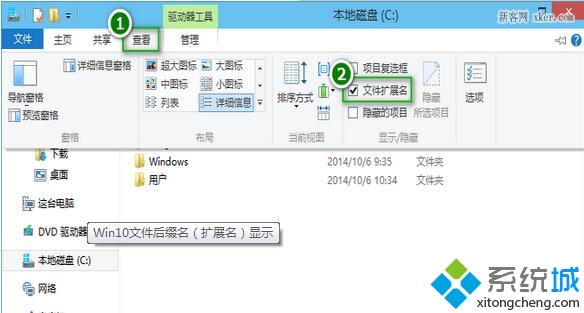



注意: 僅修改副檔名不會轉換檔案內容格式,不同類型檔案強行改副檔名可能導致無法開啟或損壞。批量修改可用指令 ren *.txt *.bat。
Windows 清除 DNS 快取指令 ipconfig /flushdns 完整教學 (含替代法:停用/啟用網卡)
Win 10 插入耳機/麥克風聽不到聲音?Realtek 音效管理器關閉「前面板插孔偵測」修復
Windows 10 安裝提示「檔案遺失或損壞」解決方案:避免使用迅雷下載 ISO
Win10 系統滑鼠指標太小看不清?輕鬆存取功能快速調大指標尺寸
Win10 任務欄固定「回收站」技巧:繞過右鍵菜單限制的兩步法
Windows 10 新增鍵盤快捷鍵與觸控手勢完整速查表:虛擬桌面、小娜、操作中心、分頁操作
Win10 更新卡住不動?重置 Windows Update 元件與 SoftwareDistribution 快取標準修復流程