想知道投稿郵件是否被編輯閱讀?Foxmail 支援請求回執。
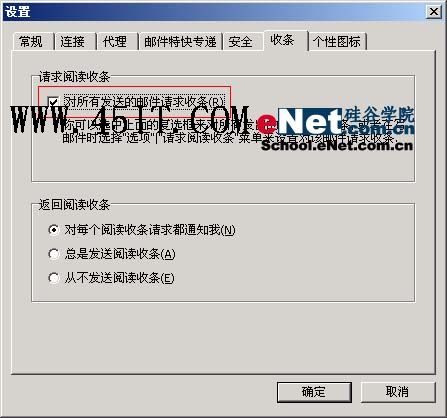
「工具/系統設定/收條」標籤,勾選「對所有發送的郵件請求收條」(圖 1)。所有寄出郵件被閱讀後自動回傳回執信。
圖 1
寫信時「選項」勾選「請求閱讀收條」,僅該郵件要求回執。
對方郵件用戶端需支援回執功能且用戶同意回傳才會收到通知。
QQ 瀏覽器收藏夾在哪裡?顯示/管理/匯入匯出完整指南
eMule 常見迷思大解惑:P2P 代系演進、運作原理、搜尋機制、優缺點一次釐清
Outlook 2007 自動存檔與手動備份:郵件資料零風險
如何正確解除安裝 IE8 並還原舊版 IE(XP/Vista/Win7/Server 完整指令)
UC 號被盜怎麼辦?複製 userlist.uc 找回好友名單、輔助申訴
安裝金山保護盾後 MSN 無法啟動的解決辦法
Skype 無法啟動?刪除 shared.lck 與 Shared.xml 設定檔即可修復
新浪微博私訊權限設定教學:三種可發私訊對象範圍任你選