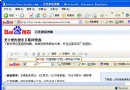
僅 IE 搜尋頁異常,嘗試以下方法:
HKEY_LOCAL_MACHINE\Software\Microsoft\Internet Explorer\Search
SearchAssistant
CustomizeSearch
https://ie.search.msn.com/{SUB_RFC1766}/srchasst/srchasst.htm
迅雷離線下載取回本地技巧:雲端完成→左側離線列表→點擊下載到本地
電子郵件格式怎麼寫?@ 符號輸入法與 163、QQ 郵箱寄信圖文教學
Foxmail 設定完整教學:新增帳號、收發信、進階參數、常見問題一次搞定
MSN/MSN Messenger 快速申請全流程:官網、軟體、第三方郵箱三大管道圖文詳解
微信好友來源顯示「朋友驗證訊息」是什麼意思?
IE8/IE7 無法輸入支付寶密碼的解決辦法
e話通視訊社群:從路人到視訊紅人的晉升之路
IE9 無法輸入網銀密碼?安裝安全控件、加入信任網站兩步搞定