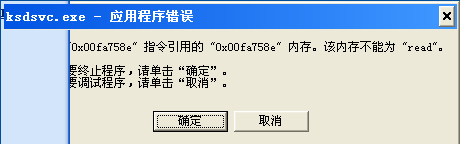
最近不知道什麼原因,開機時總會彈出一個 ksdsvc.exe 應用程式錯誤 視窗,提示某指令引用的記憶體無法讀取。這到底是怎麼回事?
經查證,ksdsvc.exe 其實是 谷歌金山詞霸 2.0 版本所包含的一個背景程序。有網友指出這個程序會常駐記憶體並設定開機自動啟動,具體功能不詳,但會導致開機報錯。
解決方法非常簡單:直接 卸載谷歌金山詞霸 2.0,開機即可恢復乾淨。值得注意的是,金山詞霸 1.9x 版本並沒有這個問題。
微信公眾號群發更換綁定手機/微信號操作指南:安全助手介面快速切換
WinGate 代理伺服器進階設定與應用技巧(五)
騰訊微博暱稱如何修改?兩步驟快速完成
微軟再次開放 MSN 8.0 邀請,搶先體驗 Windows Live Messenger
限制迅雷主動上傳:自訂模式設上傳為 0、關閉程式最徹底、綠色版/外掛完全禁用上傳
Firefox 進階技巧問答集:加速、分頁、擴充套件、下載工具整合、主題、多設定檔、字體、快取、版本相容
所有瀏覽器打開網頁一片空白無報錯?DLL 重註冊與 IE 重置雙重修復
搜狗瀏覽器「相關推薦」導航條永久關閉教學:工具箱 → 搜狗推薦 → 右鍵卸載