Windows XP Windows 7 Windows 2003 Windows Vista Windows 綜合教學 Linux 系統教學
Windows 10 Windows 8 Windows 2008 Windows NT Windows Server 電腦軟體教學
您现在的位置: Windows教程網 >> Windows教程 >  >> 電腦軟體教學 >> 網路工具

開機提示「找不到 dbgeng.dll」?下載註冊該 DLL 修復迅雷/系統元件缺失

編輯:網路工具

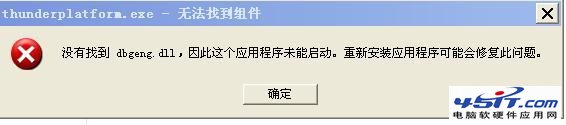
開機/開啟瀏覽器彈出 thunderplatform.exe - 找不到組件 dbgeng.dll?此為 Windows 偵錯引擎 DLL 缺失,常因迅雷/其他軟體依賴該元件但系統未預裝(精簡版/修改版系統常見)。

修復步驟

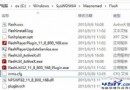
  1. 下載 dbgeng.dll(搜尋關鍵字「dbgeng.dll 下載」,或從完整系統 C:\Windows\System32 複製)。
    參考下載:https://dl-sh-ocn-1.pchome.net/32/28/dbgeng.rar
  2. 解壓縮得到 dbgeng.dll,依系統版本複製至:
    Win95/98/Me:C:\Windows\System\
    WinNT/2000:C:\WINNT\System32\
    WinXP/Win7/Win10/11:C:\Windows\System32\
  3. Win+R → 輸入 regsvr32 dbgeng.dll → 回車,提示「成功註冊」。
  4. 重啟電腦,錯誤提示消失。

補充說明

  • dbgeng.dll 為 Microsoft Debug Engine 核心元件,提供使用者模式/核心模式偵錯介面,Visual Studio、WinDbg、迅雷等軟體可能動態載入。
  • 若註冊後仍報錯,嘗試以「系統管理員身分執行」命令提示字元再次執行 regsvr32。
  • 現代 Windows 10/11 完整版預含此檔,缺失多見於 GHOST 精簡版、第三方修改版系統。
Copyright © Windows教程網 All Rights Reserved