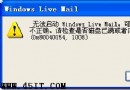
個人電腦無法存取網易博客(非官方維護),嘗試以下兩招修復:
regsvr32 jscript.dll
regsvr32 vbscript.dll
以系統管理員身分開啟命令提示字元,執行 sfc /scannow 掃描修復系統檔案,或重新註冊更多 IE 核心 DLL(如 mshtml.dll、shdocvw.dll 等)。
sfc /scannow
mshtml.dll
shdocvw.dll
多數情況下方法一即可解決,若持續失敗請檢查網路/防火牆設定。
微信密碼忘記怎麼辦?手機/郵箱/QQ 三大註冊類型分類找回全流程
免費 E-mail 郵箱分類大全:Web信箱、POP3信箱、轉信信箱優缺點對比
IE9 開啟網頁白畫面?兩招重設瀏覽器解決
巧解迅雷自動攔截下載:關閉瀏覽器與剪貼板監視,靜默下載小檔案
Outlook Express 自動回覆設定教學:外出也能即時回應郵件
軟體應用問答:移除 MSN 後無法重裝
快車新用法:善用 FlashGet 實現異地下載
微信小視頻沒聲音怎麼辦?iOS/Android 權限設定完整指南