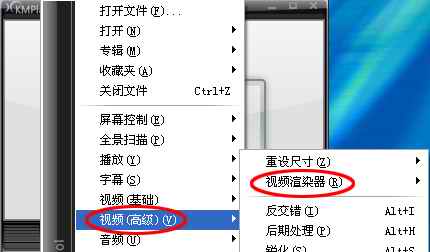
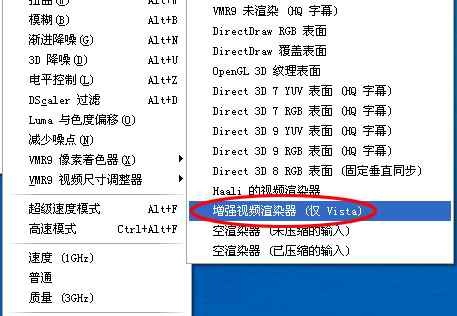
Vista 系統下啟動 KMPlayer 播放電影時,視窗標題列透明效果 (Aero Glass) 自動消失變成普通視窗;關閉 KMPlayer 後恢復正常。
使用了舊版 KMPlayer,與 Vista DWM (桌面視窗管理器) 相容性不佳。
新版已修正此相容性問題,建議直接至官網下載最新版安裝覆蓋。
EVR 是 Vista/Win7 原生支援的渲染器,能完美配合 DWM 合成,避免視窗模式切換問題。
智睿高清網絡電視停止服務說明:域名已易主、建議改用其他直播軟體
MVBOX v4.0 常見故障全攻略:播放、歌詞、攝像頭、下載、錄音問題一網打盡
浩辰 CAD 多段線高效修剪三大絕技:標準修剪、快速修剪、增強剪切實戰對比
酷狗音樂盒關閉歌詞顯示:右下角圖標一鍵關閉
美圖秀秀打造冷藍影樓風:影樓「冷藍」+ 飾品花朵 + 對比展示
百度影音截圖功能:右鍵選單「截圖→截取當前圖像」,自訂儲存路徑
美圖秀秀打造清新治癒系風格教程:磨皮、瘦臉、大眼、睫毛、調色全流程
AutoCAD 查詢指令全解:ID 點座標、DIST 距離角度、面積與質量特性