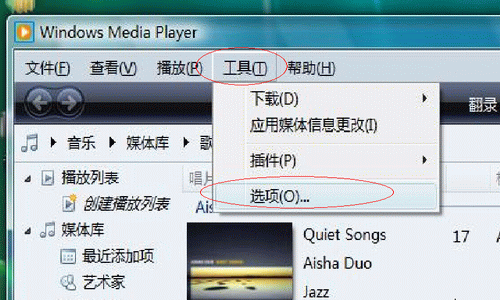
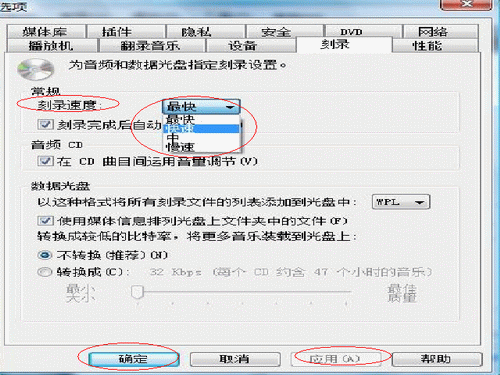
WMP 11設定燒錄速度步驟:
降低速度可提高燒錄成功率,尤其對舊光驅或劣質光碟。
AVI 格式 ≠ 高清:以解析度判定畫質,AVI 僅為容器封裝
軟體編解碼器常見問題全解析:定義、內建類型、缺失原因、DVD解碼、32/64位元相容性
Windows Media Player「找不到指定模組」?補回 quartz.dll 並重新註冊
快播雷達功能詳解與圖文教學:掃描附近用戶資源、隱私保護、屏蔽設定
CorelDRAW 抠圖七大實戰法:從貝茲曲線到 KnockOut 專業外掛全覆蓋
PPLive 常見問題解答:節目錄製保存、雙語切換、緩存管理
iTunes 是什麼?蘋果數位媒體管理播放器完整功能解析
HyperSnap 顏色修改器使用技巧:調色盤自訂色、三大填充模式實戰