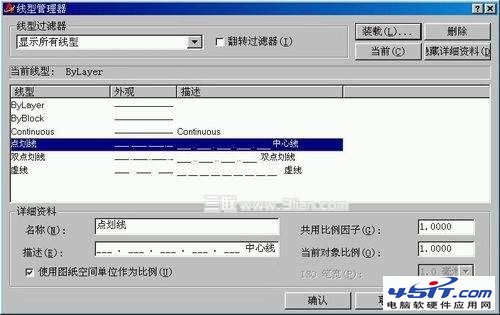
預設僅有「連續線」。BYLAYER、BYBLOCK 非真實線型,僅指向圖層/區塊設定。
對話框僅引用已載入線型。線型形狀定義於外部 .lin 檔,須載入後方可使用。
.lin
acad.lin
acadiso.lin
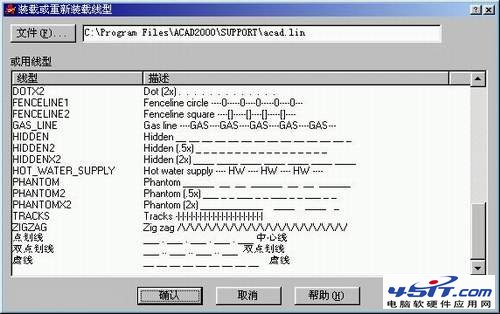
按需載入,避免圖檔膨脹。對話框右上「載入」選擇檔案 → 從清單勾選需求線型 → 確定。
千千靜聽與KMPlayer自帶原唱消音功能讓你隨時K歌
EPS 格式全攻略:專業印刷首選矢量格式的開啟、編輯與應用場景
Knockout 2.0 抠圖神器圖文教程:從入門到精通復雜邊緣(毛髮/煙霧/透明物體)
冰點文庫下載器:免費批量下載百度文庫/豆丁網文檔,無需財富值登入
MindManager 15 進階技巧:多行文本、分支間距、超鏈接管理
把千千靜聽變成收音機:新增網路電台網址、錄製即時廣播存為 WMA/MP3
Demo 是什麼意思?電腦術語與軟體版本詳解
電腦下載電影 N 種方法:線上影音網站/播放器客戶端/迅雷 BT 磁力連結全攻略