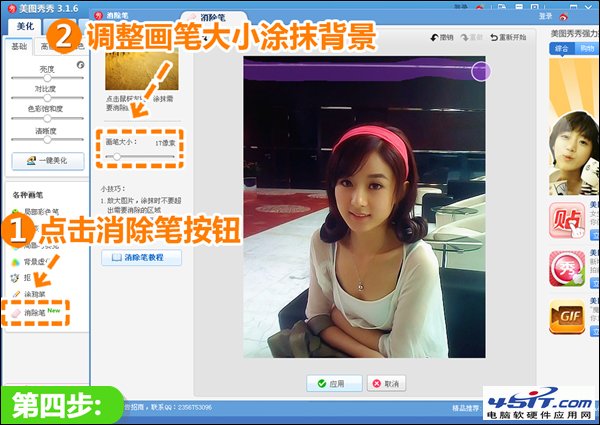
灰暗模糊手機照經此流程,層次感與清晰度顯著提升,操作簡單適合批量處理。
WAV 轉 APE 無損壓縮教學:Monkey's Audio 官方工具中文版完整操作流程
百度影音下載電影 4 步走:安裝→開網頁→右下角自動運行→點開下載
iTunes 3194 錯誤修復:Hosts 文件指向 gs.apple.com 真實 IP
暴風影音播放AVI音畫不同步?音頻切換器修正延遲
BMP 格式完整解析:結構、特性、開啟方式與優缺點
iTunes 安裝教程:官網下載、Windows 7 環境圖文步驟
ProcessOn 入門圖文教程:註冊、建檔、模板、設計器、協作、匯出全流程
暴風影音提示缺少 RealCodec 插件:清理 RealPlayer 殘留/修改註冊表