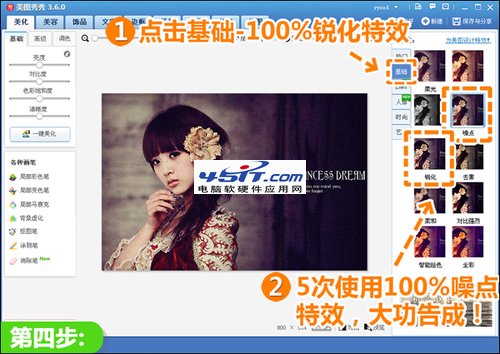
關鍵:多次疊加噪點產生膠片顆粒,暗紫調提升神秘復古意境,操作簡單適合新手嘗試多種風格組合。
智睿高清網絡電視停止服務說明:域名已易主、建議改用其他直播軟體
Flash 版本過低/被禁用?全方位升級、修復與替代方案指南
iTunes 錯誤代碼 0xE8000012 根因與修復:Lockdown 資料夾重建指南
中望 CAD 文字機制新舊對比:所見即所得編輯器與切換參數完整教學
浩辰 CAD 機械版周邊陣列教學:雙圓孔/螺紋孔參數化批量佈局
中望 CAD 2010 命令別名建立與管理教程
暴風影音播放錯誤 SHN to Wave Filter::XForm Out 解決:切換 RealMedia 播放模式
千千靜聽 EQ 均衡器進階調音:鼓樂/吉他/人聲三大預設與自訂存檔