eprt 檔案簡介
.eprt 是 SolidWorks 配合 eDrawings 輸出的零件檔案格式(同類還有 .easm 組件檔、.exe 可執行檢視檔)。用於無需安裝 SolidWorks 即可檢視、量測、標記 3D 模型。
常見問題:匯出的 eprt 無法量測?
原因:匯出時未勾選「量測功能」。免費版 eDrawings 也不支援量測,需升級至 eDrawings Professional。
正確匯出帶量測功能的 eprt 步驟
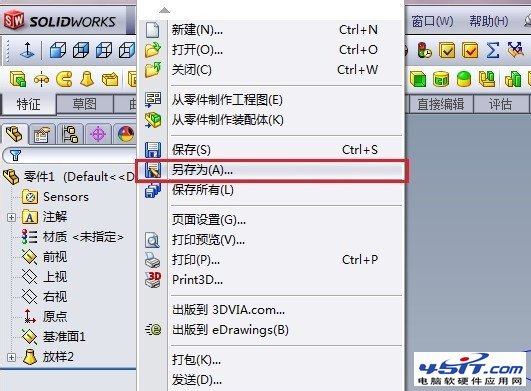
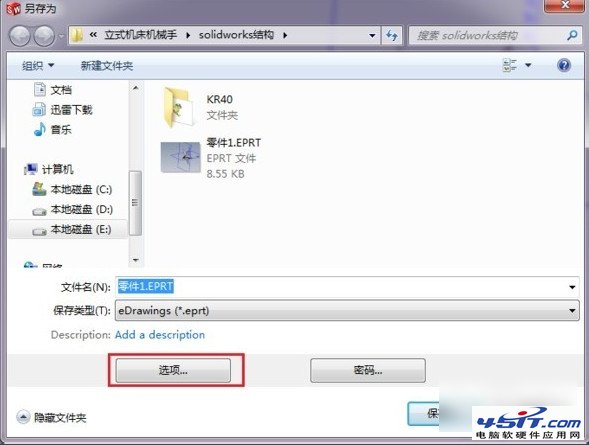
- SolidWorks 開啟模型 → 檔案 → 另存新檔。
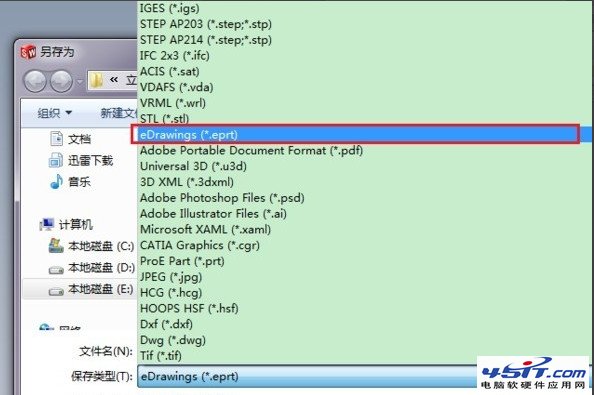
- 存檔類型選 eDrawings (*.eprt, *.easm, *.exe) → 點選 選項。
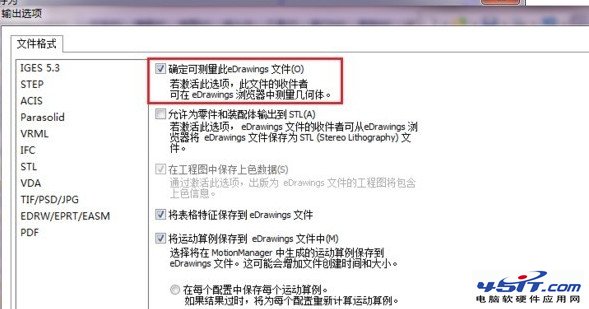
- 在選項視窗勾選 「啟用量測功能」 → 確定 → 儲存。
開啟與驗證
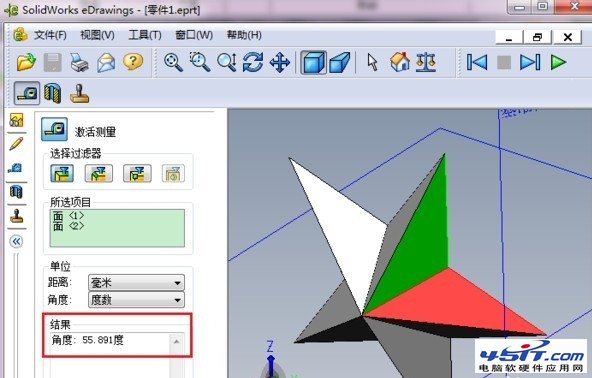
- 雙擊 .eprt 檔 → eDrawings 開啟。
- 工具列出現「量測」圖示 → 點擊即可量測長度、角度、距離等。
重要提醒
- 直接另存為 .exe 也可,同樣需在選項啟用量測。
- 免費版 eDrawings 無法使用量測功能,必須擁有 Professional 授權。
- 若僅需檢視不需量測,免費版即可滿足。