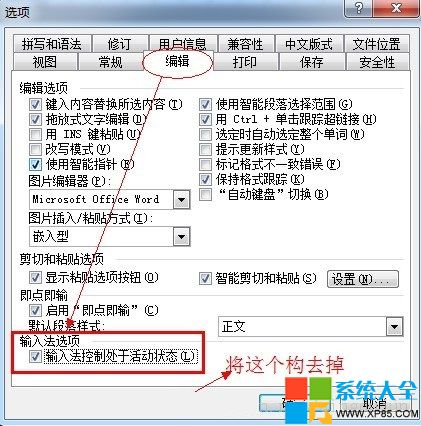
Word 2013 輸入中文無反應、只能打英文,按 Ctrl+Shift、Ctrl+Space 都無效,主因是選項中啟用了「自動切換輸入法」導致衝突。
此選項會根據游標位置自動切換輸入法狀態,與部分輸入法相容性不佳時會鎖定英文模式。
百度影音播放器截圖熱鍵預設是什麼?如何自訂快捷鍵與儲存路徑
GoodSync 讓資料夾增量備份事半功倍:本地、隨身碟、FTP 全支援、可全自動
挖掘 QQ 資料庫提取內建扁平化頭像:Data.rdb 完整解析教學
逆戰幽冥毒皇 vs 死神獵手實戰屬性對比評測:PVP 推毒皇,PVE 塔防死神更穩
Win7 下迅雷看看高清卡頓?罪魁禍首竟是 IE8 這個默認設置
向日葵遠程控制 Android 版使用教學:手機端設定與快捷鍵操作
LOL S5 賽季結束時間與段位獎勵全解析:11 月中旬預計結束,勝利皮膚為最高榮譽
CF 新建角色空白名字教程:QQ拼音輸入法特殊符號法(非改名卡)