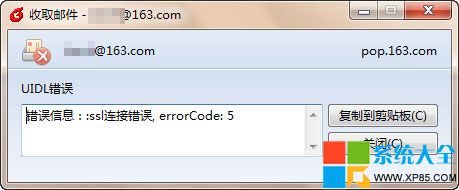
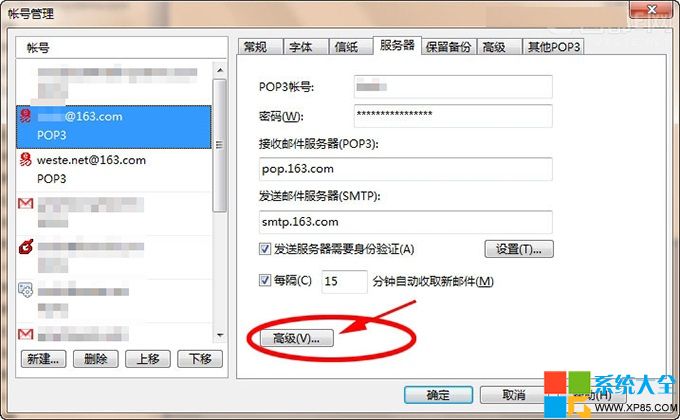
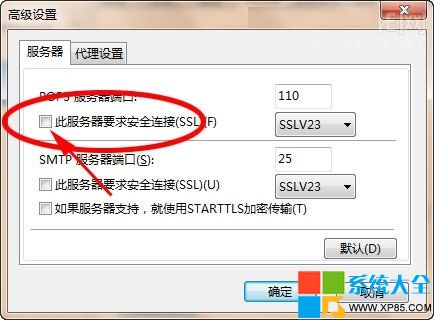
Foxmail 收取郵件出現連線錯誤,常因郵件伺服器不支援或不需 SSL 加密,但客戶端勾選了「此伺服器需要安全連線 (SSL)」。取消勾選即可恢復正常收信。
若伺服器確需 SSL(如 Gmail、Outlook.com),請改確認連接埠號(POP3 SSL 通常為 995)與網路防火牆設定,而非單純取消 SSL。
PPT 全程背景音樂不斷播:跨投影片循環播放設定教學
Win 鍵大全:20+ 組合鍵解鎖 Windows 高效操作新姿勢
CF M4A1-死神實戰評測:陳子豪解說英雄級武器屬性與實戰表現
Word 2013 插入藝術字:雙重方法打造視覺標題
LOL真人微電影第四集:五毛特效吸血鬼依然養眼
前程100 瀏覽器安裝與使用教學:學生專用、限制遊戲/QQ、家長監管
LOL 2015全球總決賽競猜活動全攻略:小組賽出線預測、積分規則、獎池兌獎詳解
避免 Apple ID 被封五大鐵律:拒絕代購、少注銷、守信用、防異地、用官方贈禮