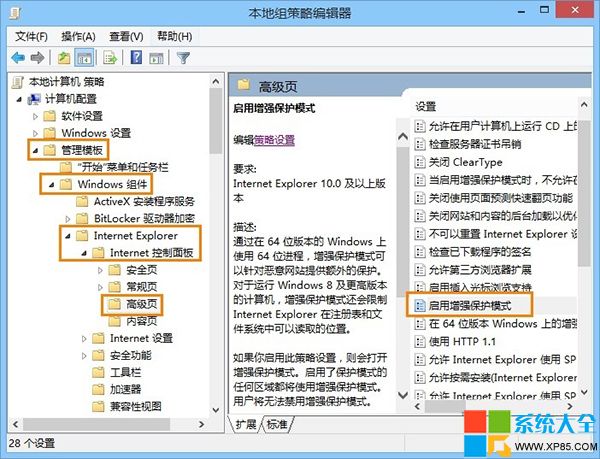
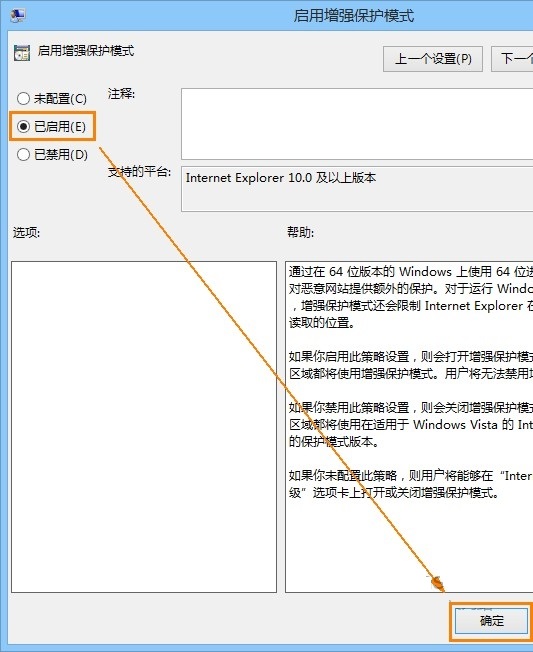
微軟近期更新將 IE11「增強保護模式」預設停用。若需此安全功能,可透過群組原則強制啟用。
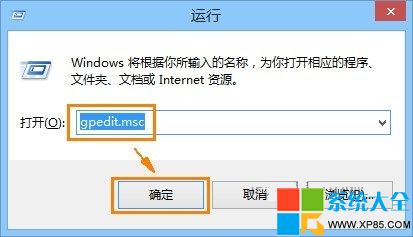
gpedit.msc
增強保護模式以 AppContainer 沙箱隔離瀏覽器進程,提升防駭安全性,建議開啟。
LOL無極劍聖易大師合金裝備皮膚特效賞析:機甲武士降臨峽谷
《刺客信條2》第一章流程全解析:教學戰鬥、跑酷比賽、克莉斯汀娜夜訪、送信、父親被捕、換裝刺客服、目睹絞刑
《海賊無雙3》噩夢模式解鎖條件:夢幻航海直線通關+全強敵擊破
QQ 空間訪客記錄怎麼刪?一招隱身瀏覽不留痕
30 秒讓電腦快一倍:垃圾清理、開機優化、病毒查殺三合一 BAT 腳本
蘋果電腦安裝 Win7 後用驅動人生管理驅動實戰
電腦輸入法圖標消失/無法切換?完整解決方案大全
光影魔術手色階調整實戰:直方圖偏左欠曝 → 拖動右側白三角到柱狀圖邊緣 → 曝光瞬間修正