三個 .bat 腳本,雙擊即執行,各約 1-3 分鐘完成:
清除系統LJ.bat)@echo off
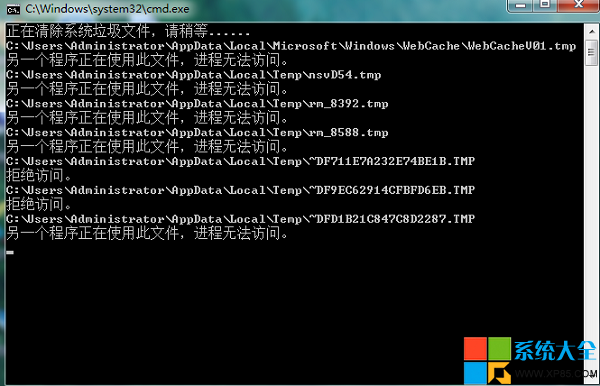
echo 正在清除系統垃圾文件,請稍等......
del /f /s /q %systemdrive%\*.tmp
del /f /s /q %systemdrive%\*._mp
del /f /s /q %systemdrive%\*.log
del /f /s /q %systemdrive%\*.gid
del /f /s /q %systemdrive%\*.chk
del /f /s /q %systemdrive%\*.old
del /f /s /q %systemdrive%\recycled\*.*
del /f /s /q %windir%\*.bak
del /f /s /q %windir%\prefetch\*.*
rd /s /q %windir%\temp & md %windir%\temp
del /f /q %userprofile%\cookies\*.*
del /f /q %userprofile%\recent\*.*
del /f /s /q "%userprofile%\Local Settings\Temporary Internet Files\*.*"
del /f /s /q "%userprofile%\Local Settings\Temp\*.*"
del /f /s /q "%userprofile%\recent\*.*"
echo 清除系統LJ完成!
pause
優化開機.bat)@ ECHO OFF
color 1f
title 清除所有多余的啟動項目
PAUSE
reg delete HKEY_LOCAL_MACHINE\SOFTWARE\Microsoft\Windows\CurrentVersion\Run /va /f
reg delete HKEY_CURRENT_USER\Software\Microsoft\Windows\CurrentVersion\Run /va /f
reg add HKEY_CURRENT_USER\Software\Microsoft\Windows\CurrentVersion\Run /v ctfmon.exe /d C:\WINDOWS\system32\ctfmon.exe
reg delete "HKEY_LOCAL_MACHINE\SOFTWARE\Microsoft\Shared Tools\MSConfig\startupreg" /f
...(保留輸入法相關啟動項)...
del "C:\Documents and Settings\All Users\開始菜單\程式\啟動\*.*" /q /f
del "C:\Documents and Settings\Default User\開始菜單\程式\啟動\*.*" /q /f
del "%userprofile%\開始菜單\程式\啟動\*.*" /q /f
start C:\WINDOWS\pchealth\helpctr\binaries\msconfig.exe
殺毒.bat)@ECHO OFF
del c:\winnt\logo1_.exe
del c:\windows\logo1_.exe
...(刪除常見病毒/後門檔案:rundl132.exe, kill.exe, sws32.dll, vdll.dll, tdll.dll 等)...
net share c$ /d
net share d$ /d
...(關閉預設共享)...
del c:\_desktop.ini /f/s/q/a
...(各盤符刪除 _desktop.ini)...
警示:註冊表/系統檔操作具風險,建議先備份或建立還原點,生產環境慎用。
Office 2013 激活教學:KMSpico 工具一鍵永久激活 (含防毒排除步驟)
FineReport 報表日期自動計算年齡:公式 year(now())-year(出生日期)+1 實現無需資料庫欄位
CF 30 元爆破/生化大禮包:低價消費買套裝送 20 元黃金體驗禮包資格,8 月 13-31 日
筆電電源適配器五大常見疑問:電壓/電流/發熱/相容性一次搞懂
《逆戰》「開學也瘋狂」每日福利活動:累計在線領武器、道具,9月15日截止
CF聯手使命召喚OL「火線兄弟齊上陣」:註冊CODOL領禮包,分享/升級/雙端登錄多重抽獎,活動網址