Windows XP Windows 7 Windows 2003 Windows Vista Windows 綜合教學 Linux 系統教學
Windows 10 Windows 8 Windows 2008 Windows NT Windows Server 電腦軟體教學
您现在的位置: Windows教程網 >> Windows教程 >  >> 電腦軟體教學 >> 電腦軟體介紹

Word 2010 一鍵轉 PPT 技巧:大綱視圖自動生成投影片

編輯:電腦軟體介紹

手動複製貼上太繁瑣?Word 2010 內建「發送至 PowerPoint」功能,配合大綱視圖可快速轉檔:

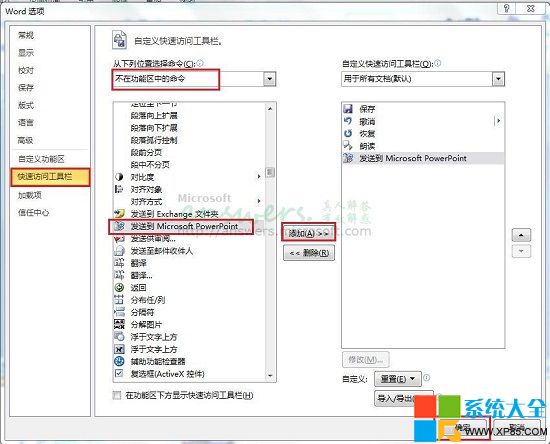
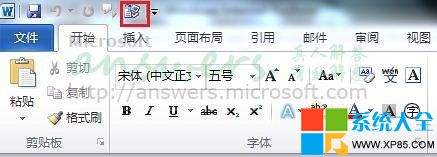
  1. 點「檔案」→「選項」→「快速存取工具列」→「不在功能區的命令」→找「發送至 Microsoft Office PowerPoint」→「新增」→「確定」,工具列即出現按鈕。
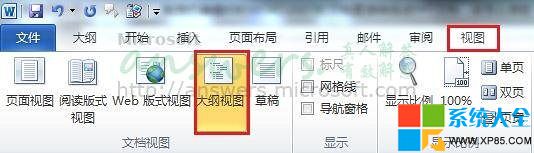
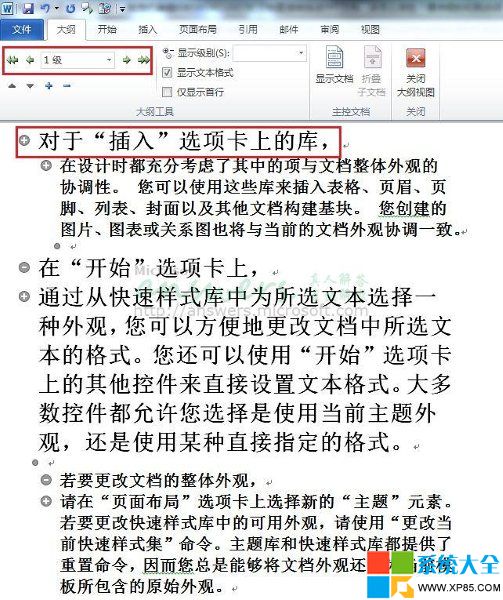
  2. 整理好 Word 文件文字,切換「檢視」→「大綱檢視」,設定各層級標題樣式(一級標題成投影片標題,二級成項目符號等)。
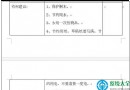
  3. 點擊工具列剛新增的「發送至 PowerPoint」按鈕,自動生成 PPT。
限制:圖片無法自動轉換,轉檔後需手動插入圖片。

Copyright © Windows教程網 All Rights Reserved