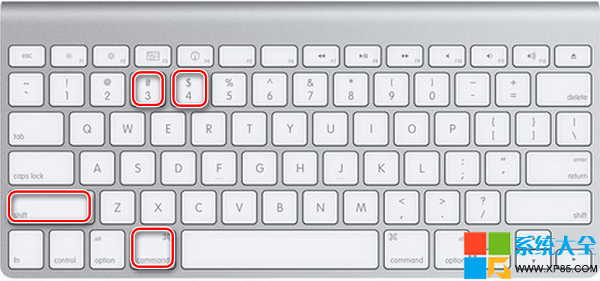
macOS 內建強大截圖功能,無需第三方軟體。以下整理所有常用與進階技巧:
進階: 上述組合鍵同時按住 Control ⌃,圖片存入剪貼簿而非檔案,可直接 Command ⌘+V 貼上。
# 修改前綴(預設為「螢幕快照」)
defaults write com.apple.screencapture name "Screenshot"
killall SystemUIServer

# 關閉視窗截圖陰影
defaults write com.apple.screencapture disable-shadow -bool true
killall SystemUIServer
# 恢復陰影將 true 改為 false
時間戳顯示 AM/PM:系統偏好設定 → 語言與地區 → 進階 → 時間 → 自訂,將「上午/下午」改為 AM/PM。
終端機執行:
/System/Library/CoreServices/loginwindow.app/Contents/MacOS/loginwindow
即可在已登入狀態下喚出登入畫面進行截圖。