手工從 DBF 資料庫複製數據到 Word 表格極其低錯。利用 VB6、ADO 讀取 DBF、OLE 自動化 Word,一段代碼實現結構固定的資料表批量匯出,適用於定期歸檔、列印輸出等場景。
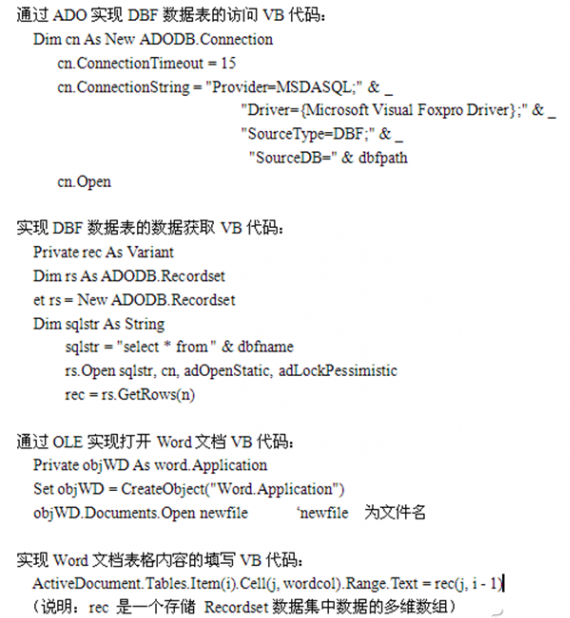
Dim cn As New ADODB.Connection
cn.ConnectionTimeout = 15
cn.ConnectionString = "Provider=MSDASQL;" & _
  "Driver={Microsoft Visual Foxpro Driver};" & _
  "SourceType=DBF;" & _
  "SourceDB=" & dbfpath
cn.Open
Private rec As Variant
Dim rs As ADODB.Recordset
Set rs = New ADODB.Recordset
Dim sqlstr As String
sqlstr = "select * from " & dbfname
rs.Open sqlstr, cn, adOpenStatic, adLockPessimistic
rec = rs.GetRows(n)  ' rec 為多維陣列存放所有欄位值
Private objWD As Word.Application
Set objWD = CreateObject("Word.Application")
objWD.Documents.Open newfile  ' newfile 為模板檔路徑
ActiveDocument.Tables.Item(i).Cell(j, wordcol).Range.Text = rec(j, i - 1)
' i: 表格索引, j: 列/行, wordcol: 目標欄, rec: 資料陣列
所有相關代碼可至 新浪愛問分享頁 下載。
固定結構的 DBF→Word 批量匯出,消除人工複製貼上錯誤,大幅提升歸檔列印效率,代碼可直接移植至 VBA 或 VB.NET 微調後使用。