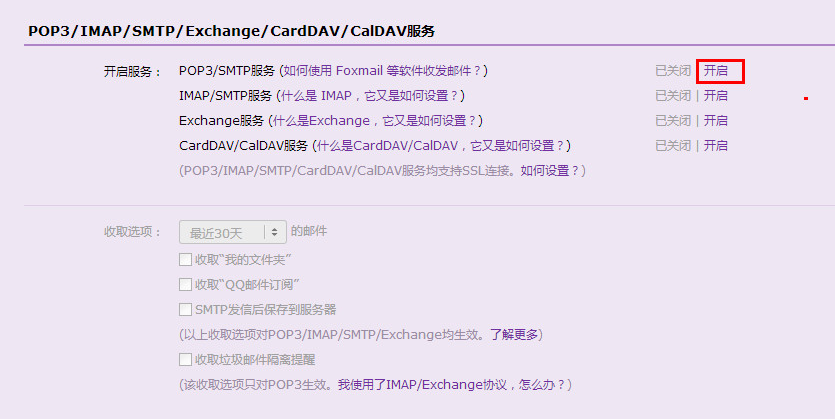
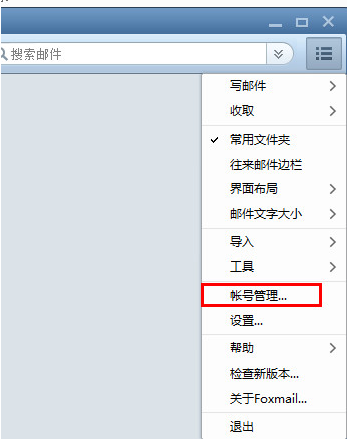
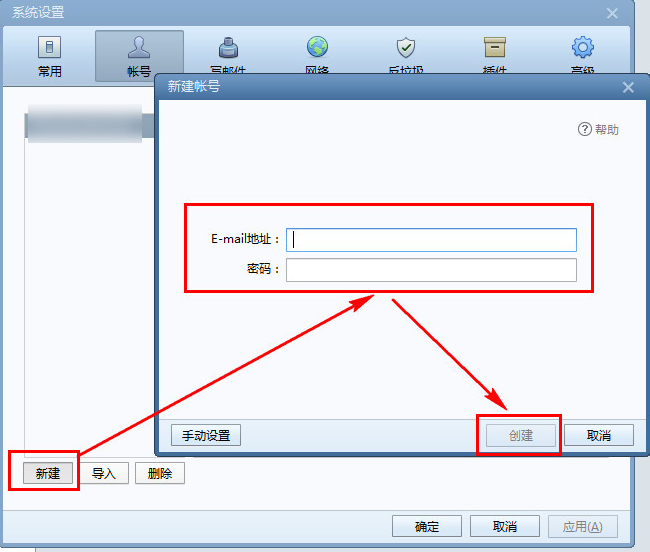
Foxmail(騰訊旗下)完美支援 QQ 郵箱,四步設定收發:QQ 郵箱開啟 POP3/SMTP → Foxmail 新增帳號輸入 QQ 郵箱 → 自動配置 → 完成。
自動匹配伺服器設定,秒速收發 QQ 郵件!
打造 Win7 + XP Mode + ylmfOS 三系統共存:兼容舊軟體、修復主系統、安全上網三不誤
茄子快傳電腦版使用教程:無線傳文件、手機連接電腦、斷開連接全圖解
無法刪除檔案「存取被拒絕」?六大原因與完整解決圖文教學
LOL 新版船長(普朗克)天賦、符文、加點與對線團戰全解析
WordPress 3.9.1 維護版發布:修復 34 個 Bug、可視化編輯器增強、音視頻播放列表、性能提升、中文在線升級指引
CF生財寶箱第四彈:10QB抽獎CF點穩賺不賠,5萬/8.88萬CF點中獎率翻倍
迅雷影音切換迷你模式:地址欄右側工具欄/右鍵菜單雙入口一鍵切
《CF》8 月最炫幸運星第五彈:1 折/3 折幸運星開放,武器/競技/生化道具最低 3 折,8.28-9.3 限時折扣