Windows XP Windows 7 Windows 2003 Windows Vista Windows 綜合教學 Linux 系統教學
Windows 10 Windows 8 Windows 2008 Windows NT Windows Server 電腦軟體教學
您现在的位置: Windows教程網 >> Windows教程 >  >> 電腦軟體教學 >> 電腦軟體介紹

Rainmeter 天氣外掛設定:Notepad++ 改碼、Weather.com/Yahoo API 代碼、公制/英制切換

編輯:電腦軟體介紹

Rainmeter 天氣皮膚多為國外作者撰寫,預設美帝地區、華氏度、Weather.com 或 Yahoo API。自訂本地天氣三步驟:

準備

  • 安裝 Notepad++(免費、語法高亮)編輯 .ini 皮膚檔。
  • 下載 Rainmeter 本體。

識別 API 來源

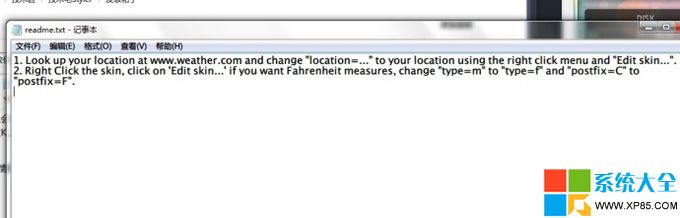
查看皮膚資料夾 readme 或 .ini 註解:
• LocationCode=字母+數字 → Weather.com API。
• LocationCode=純數字 → Yahoo Weather API。

修改代碼

  1. 右鍵皮膚 → 「編輯皮膚」或用 Notepad++ 開啟 .ini。
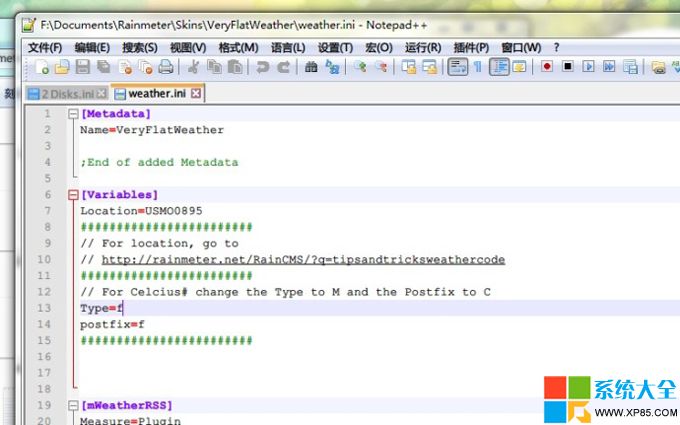
  2. 找 [Variables] 區段,修改:
    – LocationCode:到對應網站搜尋城市(拼音),取網址關鍵代碼。
      Weather.com 例:https://www.weather.com/weather/today/Chongqing+CHXX0017:1:CH → 代碼 CHXX0017。
      Yahoo 例:https://weather.yahoo.com/china/chongqing/chongqing-2158434/ → 代碼 2158434。
    – unit=m(公制/攝氏度)或 f(英制/華氏度),視註解調整。
    – 部分皮膚用 ImperialorMetric=m(m=公制)。
  3. 存檔 → Rainmeter 右鍵 → 「重新整理」皮膚生效。
Rainmeter 皮膚編輯 Variables 區段 Notepad++ 編輯介面

兩個實例完整示範,改好即享本地精準天氣。

Copyright © Windows教程網 All Rights Reserved