iOS 10 Beta 5 (開發者測試版) 帶來 8 項體感升級:
核心更新
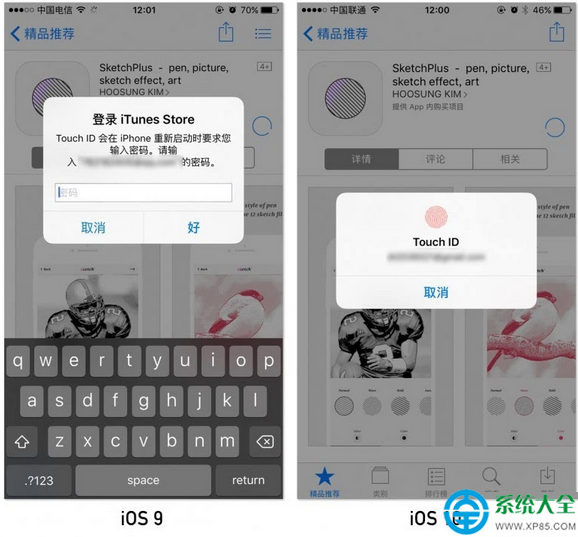
- 重啟後可直接用 Touch ID 下載 App:無需再輸入 Apple ID 密碼,密碼複雜用戶福音(iOS 9 無此功能)。
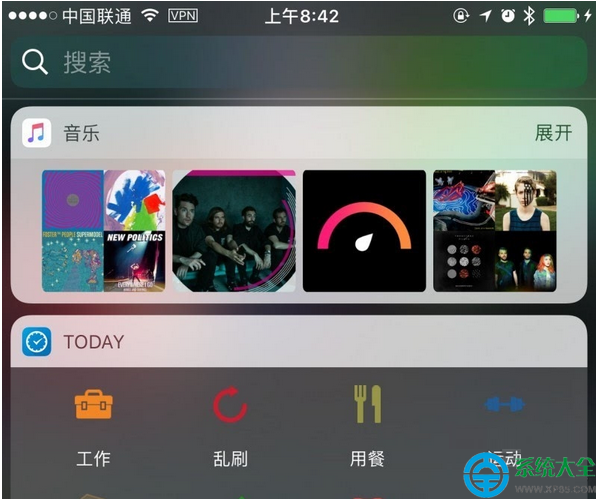
- 第三方 Widget 背景變深:與系統 Widget 風格統一;日期 Widget 現可在桌面首頁右滑直接看,不必進通知中心。
- 相簿「人物」重新掃描識別:進入「相簿」→「人物」會提示「接上電源並鎖定螢幕」後本地端重掃人臉(差分隱私,不上傳雲端)。
- 鎖屏音/鍵盤音再調整:鎖屏音像關門聲;鍵盤音音量明顯增大。
- Apple Music / 控制中心 AirPlay 圖示微調。
- 系統設定移除 Home App 相關選項。
- Smart Battery Case 正式支援 iOS 10 裝置。
Beta 版細節打磨,正式版更值得期待。