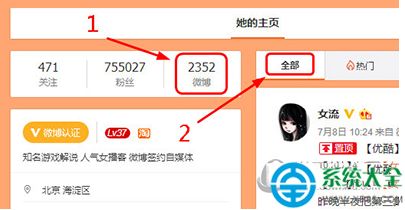
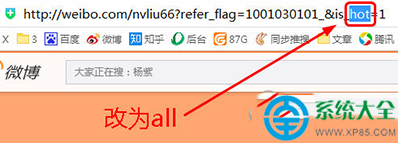
微博默認熱度序,兩法強制時間序:
hot
all
weibo.com/u/12345?hot=1
weibo.com/u/12345?all=1
登錄點按鈕、不登錄改網址,時間序/熱度序隨心換。
CF「心悅淘金潮」活動:無需心悅資格挖礦抽龍鱗等英雄武器,金鑰獲取與重置規則詳解
IDM 提示假序號?修改 hosts 檔案封鎖驗證伺服器完美解決
天涯明月刀七夕「荷花燈 2」任務全流程攻略:朱肖肖顏料選擇與對話分支詳解
茄子快傳電腦版使用教程:無線傳文件、手機連接電腦、斷開連接全圖解
我們真的需要殺毒軟體嗎?深度解析引擎核心與選擇標準
WPS 表格自訂序列:下拉選單輸入學歷、按博士到國小自動排序
QQ 音樂點歌分享給好友/群/朋友圈:試聽界面長按/懸浮 → 點歌分享 → 選平台 → 添加心情 → 發送
LOL 四周年「電玩之魂」頭像獲取條件:全服解鎖里程碑四 + 9月12日完成任務