Windows XP Windows 7 Windows 2003 Windows Vista Windows 綜合教學 Linux 系統教學
Windows 10 Windows 8 Windows 2008 Windows NT Windows Server 電腦軟體教學
您现在的位置: Windows教程網 >> Windows教程 >  >> 電腦軟體教學 >> 伺服器技術 >> 關於伺服器

Apache 最大連接數調優全攻略:從配置參數到內核重編譯

編輯:關於伺服器

核心參數:MaxClients

在 httpd.conf 中設定 MaxClients n 控制最大並發連接數。但受限於編譯時的硬性上限 HARD_SERVER_LIMIT,不同版本調整方式不同。

Apache 1.x 系列

  • n 範圍 1~256。
  • 需修改原始碼 httpd.h 中的 HARD_SERVER_LIMIT 增大後重新編譯安裝。

Apache 2.x 系列(預設 150,示範調至 1500)

  1. 編輯 httpd.conf,找到 區塊(或 worker/event MPM 對應區塊)。
  2. 調整關鍵指令:
    ServerLimit 1500
    MaxClients 1500
    MaxRequestsPerChild 0(視需求)
  3. 注意:ServerLimit 必須 ≥ MaxClients,且不超過編譯上限(通常 20000)。
  4. 儲存並重啟服務:/etc/rc.d/init.d/httpd restart 或 systemctl restart httpd。
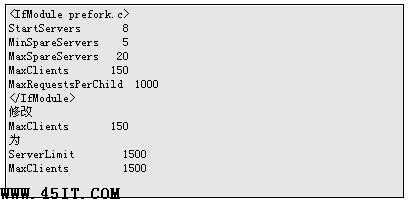
httpd.conf MaxClients 配置示例

補充說明

  • MPM 模式(prefork/worker/event)決定參數生效區塊,請依實際載入模組調整。
  • 系統層面同步調大 /etc/security/limits.conf 中 nofile 及 kernel 参数 net.core.somaxconn,否則作業系統層面仍會限制併發。
  • 監控 mod_status 觀察實際併發趨勢,按需微調。
Copyright © Windows教程網 All Rights Reserved