Google Search Console 提示:「404 錯誤頁在響應頭返回 200 (OK) 狀態碼」,導致網站驗證失敗、搜索引擎無法正確識別死鏈接,嚴重損害 SEO。
測試方法:使用 Server Header 檢查工具訪問不存在 URL,若返回 HTTP/1.1 200 OK 而非 404 Not Found,即存在配置錯誤。
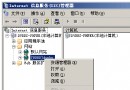
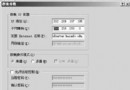
自定義 404 頁面若通過「URL 重定向」或「Server.Transfer」方式調用,服務器會先返回 200,再輸出頁面內容。必須讓服務器直接返回 404 狀態碼並輸出自定義頁面。
ErrorDocument 404 /notfound.php<configuration>
<system.web>
<customErrors mode="On" defaultRedirect="error.asp">
<error statusCode="404" redirect="notfound.asp" />
</customErrors>
</system.web>
</configuration>
<%
Response.Status = "404 Not Found"
%>
再次使用 Server Header 工具訪問不存在頁面,確認返回:
HTTP/1.1 404 Not Found
Content-Type: text/html
...
而非 `200 OK`。
正確的 404 配置核心在於:服務器層面直接返回 404 狀態碼,而非通過重定向輸出頁面。Apache 用 `ErrorDocument` 相對路徑,IIS 動態頁需在代碼中 `Response.Status = "404 Not Found"`,靜態頁勿選 URL 類型。修復後將顯著改善搜索引擎抓取效率與網站健康度。