Nginx proxy_cache (或 fastcgi_cache) 能大幅降低後端壓力,但緩存失效策略 (過期時間、手動 Purge) 是運維必修課。本文提供基於 grep+find 的通用 Shell 清理腳本,支援按 URL 路徑、文件名模糊匹配批量刪除緩存文件,並分析緩存目錄結構原理與生產環境最佳實踐。
配置 fastcgi_cache_path /data/nginx/cache levels=1:2 keys_zone=PHP_CACHE:100m; 時,緩存文件路徑為:
/data/nginx/cache/c/29/b7f54c29c8f8a7f5c4e8f8a7f5c4e8f8 # MD5(key) 最後 1 字符 / 倒數 2-3 字符 / 完整 MD5Key 組成:默認 $scheme$request_method$host$request_uri,即 GEThttps://example.com/api/user/123。
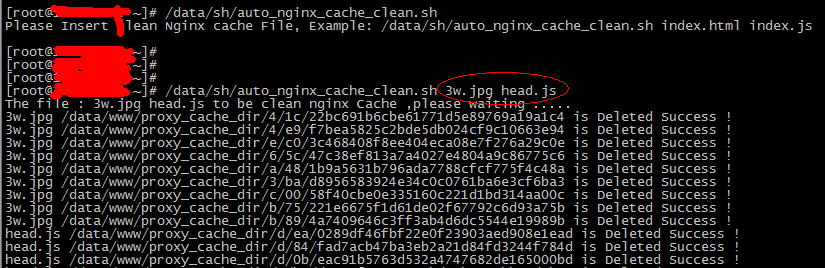
clean_nginx_cache.sh#!/bin/bash
# 用途: 批量清理 Nginx proxy_cache/fastcgi_cache
# 用法: ./clean_nginx_cache.sh "index.html" "api/user" "*.js"
# 作者: 運維團隊
# 版本: 1.1
CACHE_ROOT="/data/nginx/cache" # 需與 nginx.conf fastcgi_cache_path 一致
LOG_FILE="/var/log/clean_nginx_cache.log"
# 參數檢查
if [ $# -eq 0 ]; then
echo "Usage: $0 [pattern2] ..."
echo "Example: $0 index.html api/user \"*.js\""
exit 1
fi
echo "$(date '+%F %T') START clean patterns: $*" | tee -a "$LOG_FILE"
# 將參數轉為換行分隔,便於 grep 逐行匹配
for pattern in "$@"; do
echo "Processing pattern: $pattern" | tee -a "$LOG_FILE"
# 使用 grep -r 匹配緩存文件中的 KEY (緩存文件內容包含原始請求行)
# 注意: 緩存文件為二進制? 實際為文本 (HTTP 響應頭 + 體), 可直接 grep
# 若緩存文件極大, 建議先用 find 範圍縮小
mapfile -t cache_files < <(grep -r -l -a "$pattern" "$CACHE_ROOT" 2>/dev/null)
if [ ${#cache_files[@]} -eq 0 ]; then
echo " No cache files matched." | tee -a "$LOG_FILE"
continue
fi
for file in "${cache_files[@]}"; do
if rm -f "$file"; then
echo " DELETED: $file" | tee -a "$LOG_FILE"
else
echo " FAILED: $file" | tee -a "$LOG_FILE"
fi
done
done
echo "$(date '+%F %T') END" | tee -a "$LOG_FILE" api/user、*.js、index.html)。grep -r -l -a:-r 遞歸搜索目錄-l 僅輸出匹配的文件名 (不輸出匹配行)-a 將二進制文件視為文本 (緩存文件含 HTTP 頭 + 體,屬文本可讀)mapfile -t:將 grep 輸出按行讀入數組,避免文件名含空格導致循環錯誤。grep -r 全盤掃描極慢。生產環境建議:
ngx_cache_purge 或商業版 proxy_cache_purge,通過 HTTP 請求精確刪除單個 Key,毫秒級。location ~ /purge(/.*) { allow 10.0.0.0/8; deny all; proxy_cache_purge PHP_CACHE $1; }lua-resty-nginx-cache 遍歷共享內存區 (shm) 中的 Key 元數據,不掃描磁碟,極快。levels=1:2,可根據 Key 最後字符推算目錄,直接 find /data/nginx/cache/x/y/ -name "*pattern*" -delete。# 每天 03:00 清理 7 天前未訪問的緩存文件 (基於 atime)
0 3 * * * find /data/nginx/cache -type f -atime +7 -delete >> /var/log/nginx_cache_daily_clean.log 2>&1
# 每小時清理特定業務緩存 (如文章發布後需即時更新)
0 * * * * /opt/scripts/clean_nginx_cache.sh "article/" "api/comment/" >> /var/log/nginx_cache_hourly.log 2>&1www) 或 root 運行,確保有緩存目錄寫入權限。grep -r 造成磁碟 IO 飆升,影響線上服務。通過腳本自動化緩存清理,配合 Purge API 與合理的過期策略,可構建高效、可控的 Nginx 緩存體系。