GRUB (GRand Unified Bootloader) 是 Linux 主流開機載入器,配置檔位於 /boot/grub/grub.conf (或 menu.lst)。理解各參數含義,有助於自訂開機選單、排除開機故障、正確安裝雙系統。
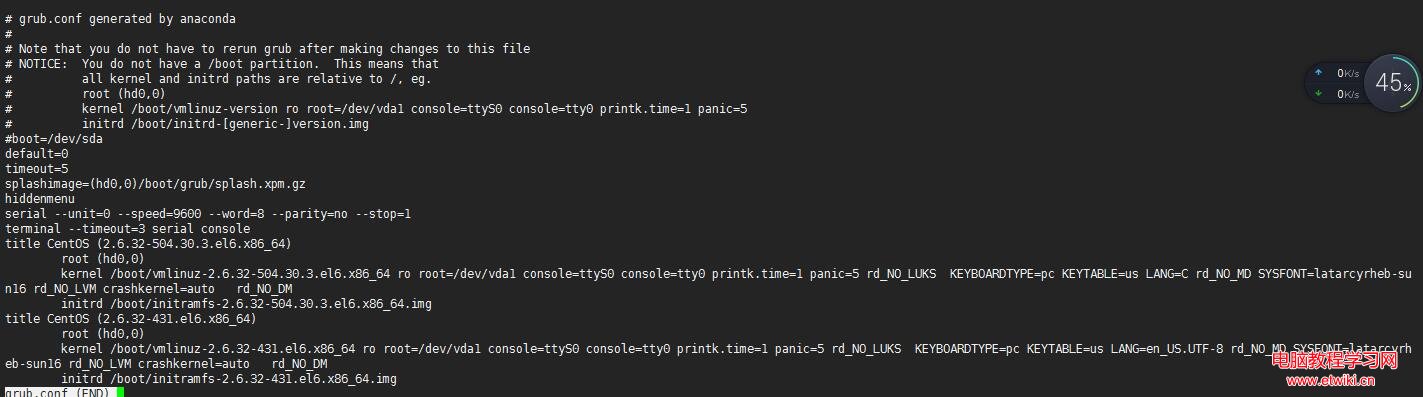
default=0           # 預設啟動第 1 個 title 項目 (0 起算)
timeout=5           # 等待使用者選擇秒數,0 為直接啟動預設項
splashimage=(hd0,3)/boot/grub/splash.xpm.gz  # 開機背景圖片路徑 (分區表示法)
hiddenmenu          # 隱藏選單,直接倒數計時
title CentOS (2.6.32-504.30.3.el6.x86_64)    # 選單顯示名稱
root (hd0,0)        # GRUB 根裝置:/boot 所在分區 (第 1 顆硬碟第 1 分區)
kernel /vmlinuz-2.6.32-504.30.3.el6.x86_64 ro root=UUID=d67e208c-2791-4692-a615-c4e96b6ae355 rd_NO_LUKS rd_NO_LVM rd_NO_MD rd_NO_DM LANG=zh_TW.UTF-8 SYSFONT=latarcyrheb-sun16 KEYBOARDTYPE=pc KEYTABLE=us crashkernel=auto
initrd /initramfs-2.6.32-504.30.3.el6.x86_64.img| 指令 | 用途 | 備註 |
|---|---|---|
root (hdX,Y) | 指定 GRUB 根裝置 (Stage 2 及 kernel/initrd 所在分區) | hd0 = 第 1 顆硬碟,Y = 分區號 (0 起算) |
kernel /path/to/vmlinuz ... | 指定核心映像檔路徑 (相對於 GRUB 根) 及核心參數 | ro = 唯讀掛載根檔案系統;root=UUID=... 指定真正的根裝置 |
initrd /path/to/initramfs.img | 指定初始 RAM 檔案系統映像 | 包含核心模組、啟動腳本,供核心掛載真實根裝置 |
必須先安裝 Windows,再安裝 Linux。
Windows 安裝程式會無條件覆寫 MBR,不識別 Linux 檔案系統與 GRUB。先裝 Linux 再裝 Windows 會導致 GRUB 被覆寫,無法進入 Linux。若已誤裝,需以 Live CD 重新安裝 GRUB (grub-install /dev/sda)。
root (hd0,0) 若指向非 /boot 分區,會出現 Error 15: File not found。grub.conf 及 /etc/fstab。initrd 缺少必要驅動 (如 SCSI/RAID 控制器),需重建 initramfs (dracut -f)。