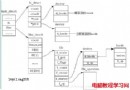
bus_type (總線)
├── kset drivers   ← 所有屬於此總線的 device_driver (kobject)
└── kset devices   ← 所有掛載在此總線的 device (kobject)

匹配流程:
裝置插入/驅動註冊 → bus->match(dev, drv) → 成功 → dev->driver = drv; drv->devices 加入 devstruct bus_type {
const char *name; // "usb", "pci", "i2c", "platform"...
struct subsystem subsys; // 內嵌 subsystem (kset)
struct kset drivers; // 驅動集合
struct kset devices; // 裝置集合
// 屬性檔支援
struct bus_attribute *bus_attrs;
struct device_attribute *dev_attrs;
struct driver_attribute *drv_attrs;
// 核心匹配回調
int (*match)(struct device *dev, struct device_driver *drv);
// 熱插拔、電源管理
int (*uevent)(struct device *dev, struct kobj_uevent_env *env);
int (*suspend)(struct device *dev, pm_message_t state);
int (*resume)(struct device *dev);
};struct device_driver {
const char *name;
struct bus_type *bus; // 所屬總線 (註冊時綁定)
struct module *owner;
const char *mod_name; // 模組名稱 (用於請求模組)
// 驅動核心操作
int (*probe)(struct device *dev); // 匹配成功後初始化裝置
int (*remove)(struct device *dev); // 裝置移除/驅動卸載
void (*shutdown)(struct device *dev); // 系統關機
int (*suspend)(struct device *dev, pm_message_t state);
int (*resume)(struct device *dev);
// 屬性
const struct attribute_group **groups;
const struct dev_pm_ops *pm;
struct driver_private *p; // 內部私有資料
};struct device {
struct kobject kobj; // 基礎物件
struct device *parent; // 父裝置 (拓撲樹)
struct bus_type *bus; // 所屬總線
struct device_driver *driver; // 綁定的驅動 (匹配成功後設定)
void *platform_data; // 平台資料 (舊式)
struct dev_pm_info power; // 電源管理資訊
struct device_private *p; // 內部私有
// ... 釋放回調、DMA mask、groups 等
};driver_register(&drv) → bus_add_driver() → 掛入 bus->drivers kset。device_register(&dev) → bus_add_device() → 掛入 bus->devices kset。bus_probe_device(dev) 遍歷 bus->drivers 列表:int bus_probe_device(struct device *dev) {
struct device_driver *drv;
list_for_each_entry(drv, &bus->drivers.kobj.kset.list, ...) {
if (bus->match(dev, drv)) { // 關鍵匹配
device_bind_driver(dev, drv); // 綁定
return 0;
}
}
return -ENODEV; // 無驅動匹配,裝置仍在 devices 列表等待
}bus->devices,dev->driver == NULL 等待。driver_register(&drv) → bus_add_driver() → driver_attach(drv) 遍歷 bus->devices:int driver_attach(struct device_driver *drv) {
return bus_for_each_dev(drv->bus, NULL, drv, __driver_attach);
}
static int __driver_attach(struct device *dev, void *data) {
struct device_driver *drv = data;
if (!dev->driver && drv->bus->match(dev, drv)) {
return device_bind_driver(dev, drv); // 綁定
}
return 0; // 繼續遍歷
}device_bind_driver
int device_bind_driver(struct device *dev, struct device_driver *drv) {
    dev->driver = drv;                    // 雙向綁定
    // 1. sysfs 建立 symlink: /sys/bus/xxx/devices/YYY/driver → ../../../drivers/ZZZ
    // 2. 驅動私有列表加入裝置
    // 3. 呼叫 drv->probe(dev) → 真正初始化硬體、申請資源、註冊 cdev 等
    // 4. 發送 uevent (add) 通知 udev 建立裝置節點
    // 5. 處理 dev_groups 屬性
}| 總線 | match 邏輯 | 關鍵標識 |
|---|---|---|
| USB | usb_device_match | idVendor, idProduct, bInterfaceClass/SubClass/Protocol |
| PCI | pci_device_match | vendor ID, device ID, subvendor, subdevice, class/revision |
| I2C | i2c_device_match | 裝置名稱字串比對 (client->name vs drv->id_table->name) |
| Platform | platform_match | 名稱字串比對 (pdev->name vs drv->driver.name) 或 OF match table |
| SPI | spi_match_device | modalias / OF match table |
驅動通常定義 struct xxx_device_id 陣列,透過 MODULE_DEVICE_TABLE 匯出,供 modprobe 自動載入。
// 遍歷總線上所有裝置
int bus_for_each_dev(struct bus_type *bus, struct device *start, void *data, int (*fn)(struct device*, void*));
// 遍歷總線上所有驅動
int bus_for_each_drv(struct bus_type *bus, struct device_driver *start, void *data, int (*fn)(struct device_driver*, void*));/sys/bus/usb/
├── devices/ ← bus->devices kset
│ ├── 1-1/ ← device kobject
│ │ ├── driver → ../../../drivers/usb/usb-storage (綁定後建立)
│ │ └── ...
│ └── 1-2/
└── drivers/ ← bus->drivers kset
├── usb-storage/ ← device_driver kobject
│ ├── module → ../../../../module/usb_storage
│ ├── new_id (動態新增 ID)
│ ├── remove_id
│ └── bind/unbind (手動綁定/解綁介面)
└── usbhid/# 解綁
echo "1-1" > /sys/bus/usb/drivers/usb-storage/unbind
# 綁定 (需驅動支援該裝置 ID)
echo "1-1" > /sys/bus/usb/drivers/usb-storage/bind
# 動態新增 ID (驅動支援 new_id)
echo "1234 5678" > /sys/bus/usb/drivers/usb-storage/new_idLinux 裝置模型以 bus_type 為中樞,雙向列表管理 drivers 與 devices,match() 為核心匹配邏輯,probe() 為實際初始化入口。理解此流程,能解決:驅動不自動綁定、多驅動搶佔裝置、手動測試驅動、熱插拔異常等高頻問題。