make-kpkg 打包流程)
make menuconfig
make-kpkg --revision=1.0 kernel-image
dpkg -i ../linux-image-2.6.18_1.0_*.deb
VFS: Cannot open root device "sda" or unknown-block(0,0)
Please append a correct "root=" boot option
Kernel panic: VFS: Unable to mount root fs on unknown-block(0,0)
VMware 預設虛擬控制器為 BusLogic / LSI Logic SCSI。內核必須內建對應低層驅動:
Device Drivers → SCSI device support → SCSI low-level drivers
  [*] BusLogic SCSI support
  [*] LSI Logic (Symbios Logic) SCSI support
使用 ext3,需設為 Y:
File systems → Ext3 journalling file system support [*]
make-kpkg --revision=1.0 kernel-image
dpkg -i ...
驅動已內建,但仍無法掛載根裝置。推測 initramfs 缺失或裝置命名問題。
make-kpkg --revision=1.0 kernel-image --initrd
dpkg -i ...
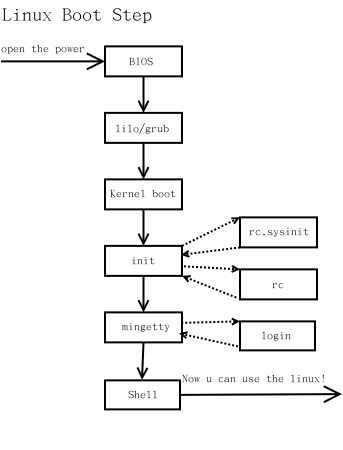
加上 --initrd 參數後,make-kpkg 自動產生包含必要模組的 initrd.img,GRUB 佈建時同步更新,內核啟動階段由 initrd 載入 SCSI/檔案系統模組並掛載真實根分區。
make-kpkg 預設不生成 initrd,假設所有啟動必需驅動皆內建。但實際上,SCSI 中層、SD 模組、磁碟分區探測 等輔助代碼若為模組,仍需 initrd 載入。CONFIG_SCSI_BUSLOGIC=y,CONFIG_SCSI_MOD、CONFIG_SD_MOD、CONFIG_BLK_DEV_SD 若為 M,內核核心無法自動載入,必須由 initrd 的 init 腳本 modprobe 載入。udev 負責建立 /dev/sda* 節點,內核直接掛載需正確節點。| 項目 | 建議設定 |
|---|---|
| 虛擬磁碟控制器 | LSI Logic SAS (較新相容性佳) |
| SCSI 低層驅動 | CONFIG_SCSI_BUSLOGIC=y / CONFIG_SCSI_LSILOGIC=y |
| SCSI 中層/磁碟 | CONFIG_SCSI_MOD=y CONFIG_SD_MOD=y CONFIG_BLK_DEV_SD=y |
| 根檔案系統 | CONFIG_EXT3_FS=y (或 ext4/xfs) |
| 打包命令 | make-kpkg --initrd --revision=custom kernel-image |
| GRUB 更新 | dpkg 安裝自動執行 update-grub |
initramfs-tools,配置 /etc/initramfs-tools/modules 強制包含模組。lsinitramfs /boot/initrd.img-2.6.18-custom。update-initramfs -c -k 2.6.18-custom。VMware 環境編譯內核,「驅動內建 + 生成 initrd」 才是穩妥組合。單純內建驅動在模組化架構下往往不足,initrd 承擔了模組載入、裝置節點建立、根分區切換等關鍵任務。理解 initrd 機制,是內核定製與驅動開發的必修課。