Windows XP Windows 7 Windows 2003 Windows Vista Windows 綜合教學 Linux 系統教學
Windows 10 Windows 8 Windows 2008 Windows NT Windows Server 電腦軟體教學
您现在的位置: Windows教程網 >> Windows教程 >  >> Linux 系統教學 >> 關於 Linux

RHEL 6.3 使用 yum 安裝 Apache 與 mod_ssl 配置虛擬主目錄與 SSL 加密

編輯:關於 Linux

RHEL 系列使用 yum 管理軟體包。本文記錄在 RHEL 6.3 上安裝 Apache、啟用 SSL、配置自定義網站目錄與虛擬主機的完整步驟。
安裝與啟動

yum install httpd
/etc/init.d/httpd start
yum install mod_ssl -y

建立自定義網站目錄並設定 SELinux

mkdir -p /date/www/html
chcon -t httpd_sys_content_t /date/ -R

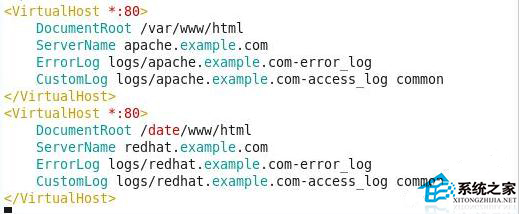
配置 Apache (httpd.conf)

  • 開啟 80 埠
  • 設定 DocumentRoot 指向 /date/www/html 與預設 /var/www/html
  • 放置測試頁面驗證

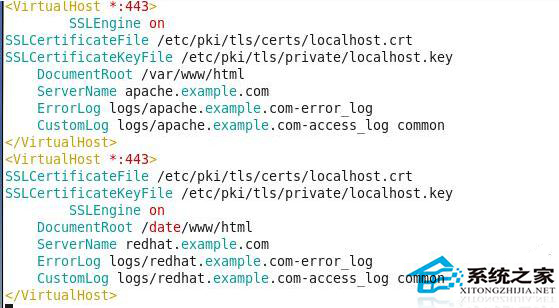
配置 SSL (ssl.conf)

  • 開啟 443 埠
  • 設定 SSLCertificateFile、SSLCertificateKeyFile
  • 配置虛擬主機支援 HTTPS

完成配置後重啟 httpd 服務,即可同時提供 HTTP 與 HTTPS 服務。

Copyright © Windows教程網 All Rights Reserved