Glances 是一套以 Python 撰寫的跨平台系統監控工具,能在單一畫面即時顯示 CPU、記憶體、磁碟 I/O、網路、程序等關鍵指標,並支援 Client/Server 模式與多種匯出格式(HTML、CSV)。本文詳細說明安裝需求、部署步驟與常用參數。
# pip install psutil
# pip install pysensors
# pip install hddtemp
# git clone https://github.com/nicolargo/glances.git
# cd glances
# python setup.py install| 參數 | 說明 |
|---|---|
-b | 以 Bytes/sec 顯示網路速率 |
-c @IP|host | 連線至 Glances Server |
-s | 啟動 Server 模式 |
-p PORT | 指定 TCP 埠(預設 61209) |
-t sec | 設定重新整理間隔(預設 3 秒) |
-o HTML|CSV | 匯出報表格式 |
-r | 不列出程序(降低 CPU 佔用) |
-e | 啟用感測器模組(僅 Linux) |
-y | 啟用 hddtemp 磁碟溫度模組 |
-1 | 啟用每核心 CPU 模式 |
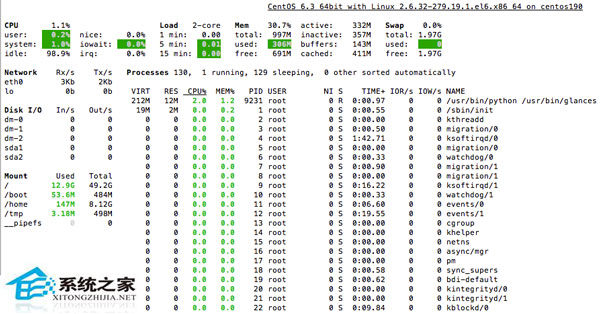
善用參數組合,Glances 可滿足從快速巡檢到長期效能分析的多樣化監控需求。
Linux Apache 解決 GBK/GB2312 網頁亂碼:httpd.conf AddDefaultCharset 五種修正方案
Ubuntu 桌面版啟用藍牙耳機完整設定 (A2DP 高保真模式)
修復 Ubuntu apt-get 提示 Unable to locate package 錯誤只需執行 apt-get update
CentOS 啟動 Eclipse 報錯 Failed to load the JNI shared library 解決辦法
Ubuntu 終端提示符美化:將用戶名設置為醒目紅色的完整配置指南
解決雙硬碟安裝 Linux 提示 boot/efi 未分配空間的 BIOS 設定調整