Ubuntu 12.04 更新時若提示 /boot 分區空間不足,通常是累積過多舊版核心佔用空間。本文說明如何安全移除不需要的舊核心套件。
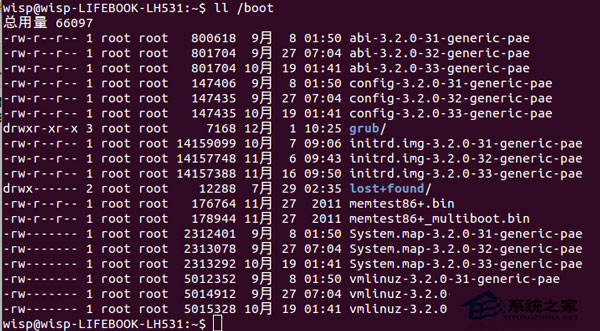
dpkg --get-selections | grep linux-image
輸出範例:
linux-image-3.2.0-31-generic-pae    install
linux-image-3.2.0-32-generic-pae    install
linux-image-3.2.0-33-generic-pae    install
linux-image-3.2.0-34-generic-pae    install
linux-image-3.2.0-35-generic-pae    install
uname -r
# 輸出範例:3.2.0-35-generic-pae
注意:切勿移除目前正在使用的核心套件!
sudo apt-get remove linux-image-3.2.0-31-generic-pae
可一次移除多個:
sudo apt-get remove linux-image-3.2.0-31-generic-pae linux-image-3.2.0-32-generic-pae
sudo apt-get autoremove
sudo apt-get autoclean
df -h /boot
若清理後空間仍不足,請檢查 /boot 是否有大型非核心檔案(如手動備份的 initrd、vmlinuz),或考慮調整分區大小。
apt-get autoremove 自動清理不再需要的依賴套件。/boot 獨立分區較小(< 500MB),建議安裝時規劃較大空間或使用 LVM。