Ubuntu 升級時提示 /boot 空間不足(預設僅 256MB),因舊核心映像檔堆積。本文說明查看已安裝核心、確認當前運行核心、選擇性移除舊核心套件、清理殘留檔案與 /usr/src 目錄的完整操作流程。
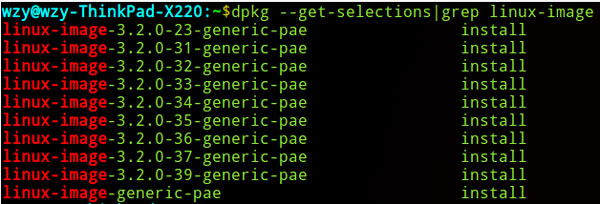
dpkg --get-selections | grep linux-image
# 輸出範例:
# linux-image-3.13.0-32-generic      install
# linux-image-3.13.0-35-generic      install
# linux-image-3.13.0-36-generic      install
# linux-image-3.13.0-37-generic      install
# linux-image-3.13.0-39-generic      install
# linux-image-extra-3.13.0-32-generic install
# ...uname -a
# Linux ubuntu 3.13.0-39-generic #66-Ubuntu SMP ...
# 當前核心:3.13.0-39-generic# 僅保留當前核心與前一版本(回滾備用),刪除其餘
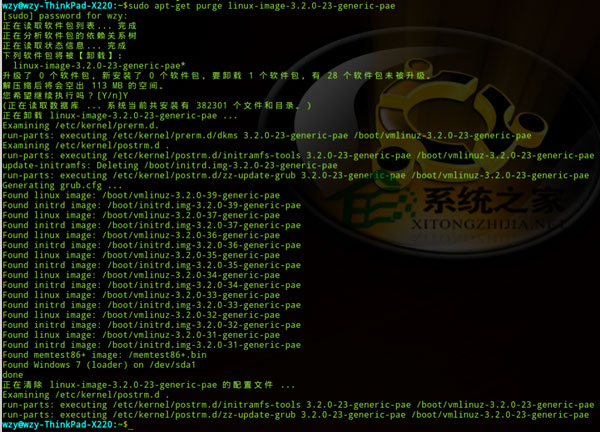
sudo apt-get purge linux-image-3.13.0-32-generic linux-image-extra-3.13.0-32-generic
sudo apt-get purge linux-image-3.13.0-35-generic linux-image-extra-3.13.0-35-generic
sudo apt-get purge linux-image-3.13.0-36-generic linux-image-extra-3.13.0-36-generic
# linux-image-extra 含對應模組,需一併移除dpkg -l | grep ^rc | awk '{print $2}' | xargs sudo apt-get purge -y
# 或針對核心:
dpkg -l 'linux-image-*' | grep ^rc | awk '{print $2}' | xargs sudo apt-get purge -yls /usr/src
# linux-headers-3.13.0-32 linux-headers-3.13.0-35 ...
sudo rm -rf /usr/src/linux-headers-3.13.0-32 /usr/src/linux-headers-3.13.0-35 ...
# 僅刪除已移除核心對應的 headers 目錄df -h /boot
# 應顯示可用空間大幅增加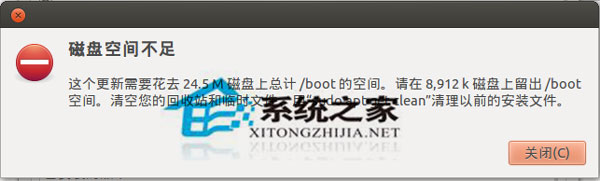

#!/bin/bash
# 保留當前核心與前一版本,自動刪除其餘
CURRENT=$(uname -r | sed 's/-generic//')
PREV=$(dpkg --get-selections | grep 'linux-image-[0-9]' | grep -v deinstall | awk '{print $1}' | sort -V | grep -B1 "$CURRENT" | head -1 | sed 's/linux-image-//')
echo "保留: $CURRENT, $PREV"
dpkg --get-selections | grep 'linux-image-[0-9]' | grep -v deinstall | awk '{print $1}' | while read pkg; do
    ver=$(echo $pkg | sed 's/linux-image-//' | sed 's/-generic//')
    if [[ "$ver" != "$CURRENT" && "$ver" != "$PREV" ]]; then
        echo "移除: $pkg"
        apt-get purge -y "$pkg" "${pkg/image/extra}"
    fi
done
apt-get autoremove -y
dpkg -l | grep ^rc | awk '{print $2}' | xargs apt-get purge -y 2>/dev/null/boot(建議 512MB~1GB)。apt-get autoremove 清理舊核心。unattended-upgrades 並設定 Remove-Unused-Dependencies "true"。