華碩 F81se 系列筆電安裝 Ubuntu 12.04 時,開機過程顯示大量 Cannot allocate resource for EISA slot X 錯誤,導致安裝程式無法啟動。此為 BIOS 對舊式 EISA 總線資源配置與新版核心 ACPI 驅動衝突所致,透過 BIOS 設定鎖定特定介面即可解決。
| 選項 | 預設 | 建議設定 | 說明 |
|---|---|---|---|
| New Card Interface | Unlocked | Locked | 關鍵:必須鎖定,否則 Ubuntu 12.04 無法啟動 |
| Wireless Network Interface | Unlocked | Locked(建議) | 有助安裝過程穩定,安裝完成後可改回 Unlocked |
| ODD Interface | Unlocked | Unlocked | 鎖定會關閉光碟機,無法安裝 |
| USB Interface | Unlocked | Unlocked | 鎖定會關閉 USB,無法使用安裝隨身碟 |
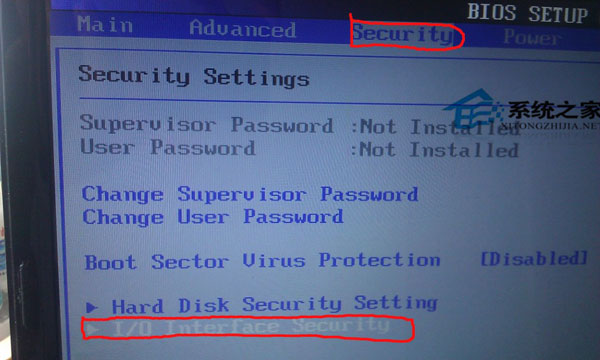
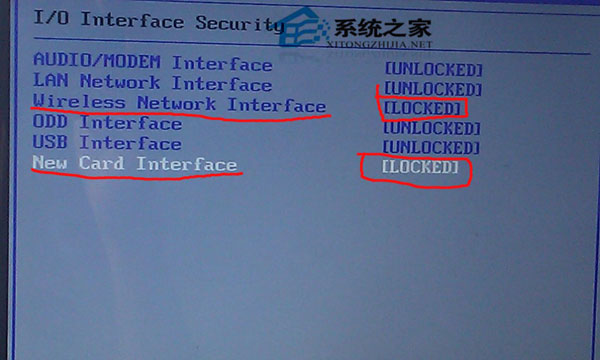
調整 BIOS I/O Interface Security 中的 New Card Interface 為 Locked,即可解決華碩 F81se 安裝 Ubuntu 12.04 的 EISA slot 資源衝突錯誤,順利完成安裝與後續啟動。