Jenkins 是最廣泛採用的開源 CI/CD 平台,支援豐富外掛生態。本文記錄在 CentOS 環境下透過 yum 安裝 Jenkins、整合 Git/GitHub、設定 SSH 金鑰與郵件通知的完整流程,適合快速建置自動化建置流水線。
# 匯入官方倉庫與金鑰
sudo wget -O /etc/yum.repos.d/jenkins.repo https://pkg.jenkins.io/redhat-stable/jenkins.repo
sudo rpm --import https://pkg.jenkins.io/redhat-stable/jenkins.io.key

# 安裝 Jenkins 並啟動
sudo yum install -y jenkins
sudo systemctl enable --now jenkins

# 防火牆開放 8080
firewall-cmd --permanent --add-port=8080/tcp
firewall-cmd --reload
瀏覽器開啟 https://,依提示完成初始化解鎖(初始密碼位於 /var/lib/jenkins/secrets/initialAdminPassword)。
sudo yum install -y git zlib-devel openssl-devel perl cpio expat-devel gettext-devel curl-devel autoconf
# 若需特定版本可自行編譯安裝# 修改 jenkins 使用者 shell
sudo usermod -s /bin/bash jenkins
# 切換至 jenkins 使用者產生金鑰
sudo su - jenkins
ssh-keygen -t rsa -b 4096 -C "jenkins@yourdomain.com"
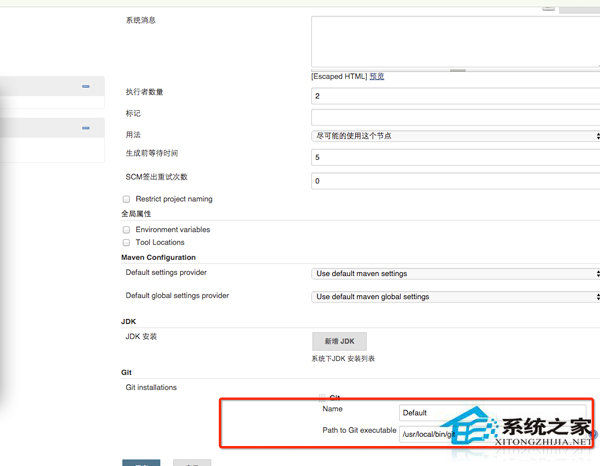
# 將 ~/.ssh/id_rsa.pub 內容加入 GitHub/GitLab Deploy Keys 或使用者 SSH KeysGit plugin、GitHub plugin、Pipeline 等。/usr/bin/git)、Git 使用者名稱/信箱。# Jenkinsfile 範例(放置於專案根目錄)
pipeline {
agent any
stages {
stage('Checkout') { steps { git 'git@github.com:user/repo.git' } }
stage('Build') { steps { sh 'mvn clean package' } }
stage('Test') { steps { sh 'mvn test' } }
stage('Deploy') { steps { sh './deploy.sh' } }
}
post {
always { mail to: 'team@example.com', subject: "Build ${currentBuild.result}", body: "${BUILD_URL}" }
}
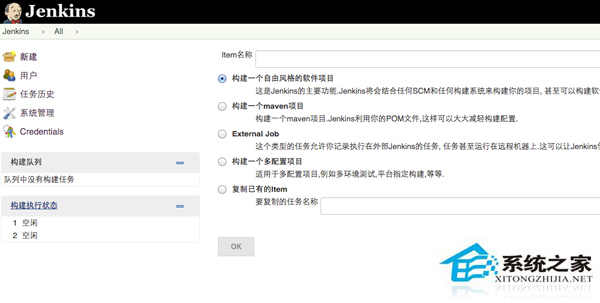
}新建專案選擇「Pipeline」,SCM 選 Git,填入倉庫 URL 與憑證,Script Path 填 Jenkinsfile 即可。
Linux mydumper 報錯 libmysqlclient_16 not defined 解決:LD_LIBRARY_PATH 引入 MySQL 函式庫路徑
CentOS 完整卸載 LAMP 環境:Apache、MySQL、PHP 分步驟清理指南
Linux Shell 腳本分割大型文字檔:split + 遞迴切割實戰
smbclient 指令實戰:列出共享、互動式 FTP 模式、單指令操作、掛載遠端 SMB 分享
Linux 記憶體緩存釋放實戰:drop_caches 參數詳解、安全釋放流程與自動化策略
Linux 編譯連結報「undefined reference to `dlclose'」解決方案