xlsfonts 是 X Window 系統工具,用於列出 X Server 當前可用的字體名稱及屬性。雖然現代桌面環境多使用 Fontconfig/Freetype 管理字體,但 xlsfonts 在排查 X 字體問題、配置舊版 X 應用、編寫 X 资源文件時仍有價值。本文完整解析所有參數與實用示例。
xlsfonts [-1Clmou] [-display host:display] [-fn pattern] [-ll] [-lll] [-n columns] [-w width]
| 參數 | 長選項 | 功能描述 |
|---|---|---|
-1 | 單列模式輸出,每行一個字體名稱,便於腳本處理 | |
-C | 多列模式輸出(默認),自動適配終端寬度 | |
-display host:display | 指定目標 X Server(如 :0、192.168.1.100:1),默認 $DISPLAY | |
-fn pattern | 模式匹配過濾字體(支援 * ? 通配符),如 -fn '*helvetica*' | |
-l | 顯示字體屬性:Foundry、Family、Weight、Slant、Setwidth、AddStyle、PixelSize、PointSize、Resolution、Spacing、AverageWidth、Charset、Encoding | |
-ll | 顯示更詳細屬性(含 FontAscent、FontDescent、MaxBounds 等) | |
-lll | 顯示最完整屬性(含每個字符的度量信息),輸出極大 | |
-m | 配合 -l 顯示字體像素大小範圍 | |
-n columns | 指定多列模式下的列數 | |
-o | 以 OpenFont 格式輸出(XLFD 名稱) | |
-u | 不排序,按 X Server 返回順序輸出 | |
-w width | 指定每列最大字符寬度 |
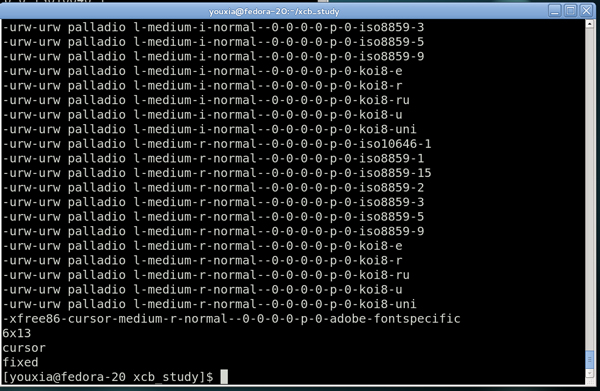
xlsfonts -1 | head -20
# -misc-fixed-medium-r-semicondensed--13-120-75-75-c-60-iso8859-1
# -misc-fixed-bold-r-normal--13-120-75-75-c-70-iso8859-1
# ...
# 查找所有 DejaVu 字體
xlsfonts -fn '*dejavu*' -1

# 查找所有等寬字體
xlsfonts -fn '*mono*' -1
xlsfonts -fn '*fixed*' -1
xlsfonts -fn '-misc-fixed-medium-r-normal--13-120-75-75-c-70-iso8859-1' -l
# 輸出:
# -misc-fixed-medium-r-normal--13-120-75-75-c-70-iso8859-1
#   FOUNDRY: misc
#   FAMILY_NAME: fixed
#   WEIGHT_NAME: medium
#   SLANT: r
#   SETWIDTH_NAME: normal
#   ADD_STYLE_NAME: ""
#   PIXEL_SIZE: 13
#   POINT_SIZE: 120
#   RESOLUTION_X: 75
#   RESOLUTION_Y: 75
#   SPACING: c
#   AVERAGE_WIDTH: 70
#   CHARSET_REGISTRY: iso8859
#   CHARSET_ENCODING: 1
xlsfonts -display 192.168.1.50:0 -1 | wc -l
標準 XLFD 格式(14 個字段,用 - 分隔):
-Foundry-Family-Weight-Slant-Setwidth-AddStyle-PixelSize-PointSize-ResX-ResY-Spacing-AvgWidth-CharsetRegistry-CharsetEncoding
| 字段 | 含義 | 常見值 |
|---|---|---|
| Foundry | 字體廠商 | misc, adobe, b&h, cronyx |
| Family | 字體家族 | fixed, helvetica, times, courier, dejavu |
| Weight | 粗細 | medium, bold, light |
| Slant | 傾斜 | r (roman), i (italic), o (oblique) |
| Setwidth | 字寬 | normal, condensed, extended |
| AddStyle | 附加風格 | 通常為空 |
| PixelSize | 像素高度 | 12, 13, 14... |
| PointSize | 點大小 (1/72 inch) | 120 = 12pt |
| ResX/ResY | 水平/垂直分辨率 | 75, 100 |
| Spacing | 間距類型 | p (比例), m (等寬), c (字符單元) |
| AvgWidth | 平均寬度 (1/10 像素) | 80 = 8.0 像素 |
| CharsetRegistry/Encoding | 字符集註冊/編碼 | iso8859-1, iso10646-1 (Unicode) |
現代 Linux 桌面(GNOME、KDE、Xfce)使用 Fontconfig 管理字體,推薦工具:
| 命令 | 用途 |
|---|---|
fc-list | 列出所有 Fontconfig 可見字體(含 TTF/OTF/Type1),支援 :family=DejaVu 過濾 |
fc-match | 查找匹配模式的最佳字體(如 fc-match 'sans:bold') |
fc-query | 查詢字體文件詳細屬性 |
fc-cache -fv | 重建字體緩存(安裝新字體後必跑) |
| 現象 | 原因 | 解決 |
|---|---|---|
xlsfonts: command not found | 未安裝 xorg-x11-apps / x11-apps | yum install xorg-x11-apps / apt install x11-apps |
| 列出字體為空 | X Server 未運行、$DISPLAY 未設置、字體路徑未配置 | 啟動 X、export DISPLAY=:0、檢查 /etc/X11/fontpath.d/ |
| 舊版 X 應用找不到字體 | 應用使用 XLFD 直接請求,Fontconfig 未暴露 | xset +fp /usr/share/fonts/... 添加字體路徑,xset fp rehash |
掌握 xlsfonts 能幫助理解 X 字體機制,排查經典 X 應用字體缺失問題;日常桌面開發請優先使用 Fontconfig 工具鏈。