在 Linux 系統中,若未使用 PASSWORD() 函數直接修改 MySQL root 密碼,會導致 mysql 系統資料庫消失,造成無法正常登入。以下提供標準修復流程。
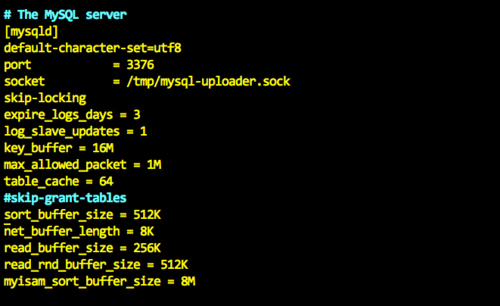
my.cnf(或 my.ini),在 [mysqld] 區段加入 skip-grant-tables。systemctl restart mysqld(或 service mysql restart)。mysql -u root
UPDATE user SET authentication_string=PASSWORD('新密碼') WHERE User='root';
FLUSH PRIVILEGES;
EXIT;my.cnf 註解或刪除該行。注意:MySQL 5.7+ 版本密碼欄位為 authentication_string,舊版為 password。日後修改密碼請務必使用 ALTER USER 'root'@'localhost' IDENTIFIED BY '新密碼'; 或 SET PASSWORD = '新密碼'; 等官方語法,避免再次發生此問題。